
How to use Instagram for learning?
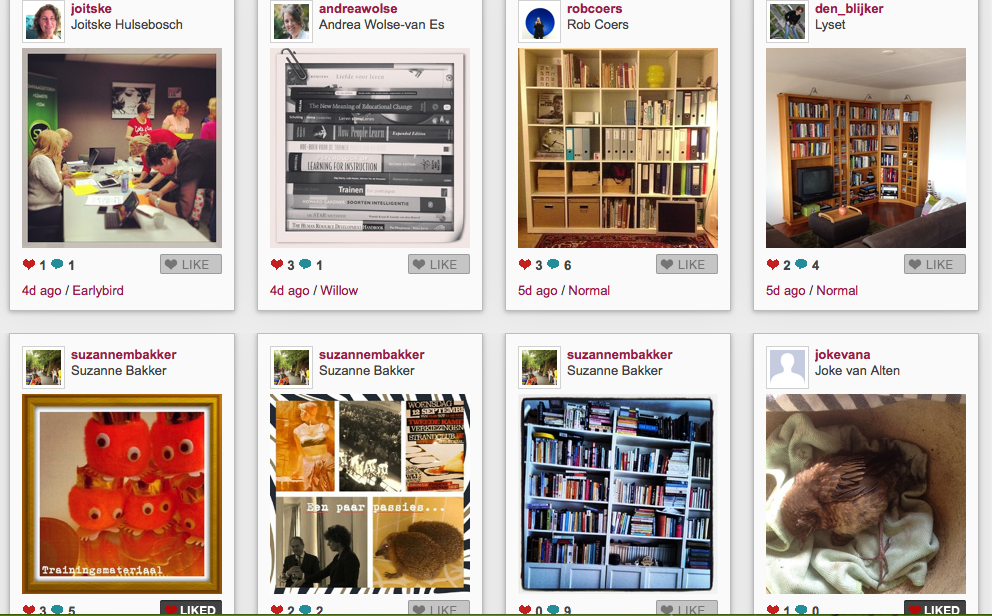
That was the central question for the group of LOSmakers, a group of learning professionals interested in social media. Instagram is a photo app for the smartphone. The LOSmakers had a skype to discuss Instagram and as experiment Joitske Hulsebosch asked everybody to install instagram on smartphone or tablet and to post one photo each day using the tag #losmakers. The photo should tell the other participants something about yourself. Via web.stagram you can watch the pictures via the web and you can also react online, as long as you sign in.
In the Skype 3 questions were central:
- How were your first experiences with Instagram?
- What are the pros and cons of the tool?
- How could Instagram be used in a learning trajectory or training?
How were the experiences with Instagram?
The experiences were very positive. What struck me was that pretty soon a group process developed, because people adding commentaries and also responded by their choice of pictures. Without typing long documents or introduction you still got a picture of the other participants. The images tickled the imagination. What happened was that a picture of one person led to the emergence of a series of photos on the same theme, we had the themes 'books' and 'fear of heights'. For instance, one of the participants placed a picture of her bookcase, which other participants followed. It was concluded that we all are active online, but fortunately also cherish our books on paper. The participants quite regularly look at the pictures of the others, which was fueled by a kind of curiosity and being drawn into the exercise. The hashtag (#losmakers in this case) was important because it was the binding factor. It felt safe to share an image without (much) words to tell something about yourself. On the other hand it was partly perceived as unsafe, because everyone can see the pictures. One participant said, "I chose different images because I knew the pictures are in a public place". If your photos on Instagram is private they are unfortunately not visible when others searching on the hashtag.
Pros and cons
What are the pros and cons of the tool Instagram? The app is very easy to use without any instructions. Via 'discovery' you can easily check whether there are any new pictures with your hashtag. The power of instagram is that you only use images (with short commentaries). It is very easy to share the pictures on other platforms too, for instance to your facebook account. You can use web.stagram or wegram to watch the images online and add commentaries if you wish. Via de app Instacollage you have even more options to make photo collages.
There does not seems to be a separate app for the iPad, but the iPhone version works well on the iPad. You just have to make a conscious choice whether you want an open or closed profile. If you have a closed profile, then your pictures (even though they have a hashtag) will not be visible to other participants, unless everyone accepts you as a follower. That's quite cumbersome process, to make sure everybody follows everybody, hence following a hashtag is much more convenient, but then you need to have your profile public.
A major drawback is that you cannot create a group. Of course you can switch to other alternatives as a private Facebook group, or a private Yammer group. But, you'll benefit less from the power of only photo sharing, the instagram experience.
Most important is that you'll have to considering whether everybody can easily participate because you need a smartphone or tablet. Though you can view the photos and respond through websites like web.stagram the participation is different. Furthermore, if you have another platform for your group, how open will your participants be to create an instagram account? Hence you may check upfront how many have a smartphone/tablet and already have an instagram account.
How to use instagram in training and learning trajectories? The participants in the Skype brainstormed about 4 ways to use instagram.
- as a getting to know eachother exercise
- as a ramp up to a discussion about any topic (face-to-face or online in a webinar)
- as entry to share your practice
- as means to reflect / evaluate
Instagram can be used to start discussions. For example, to discuss the topic 'innovation', you might ask participants to share places that they associate with innovation. In a follow-up session you can then elaborate on the pictures and associations that are made. Again, the strength of Instagram make the use of the imagination and associations of people, then it operates in the same way as the working association with tickets. If you ask for a week every day to put a picture people properly dealing with the subject.
If you want to bet for participants to give each other a look into their daily practice you can ask to photograph some parts of their worklife. This can be a picture of colleagues who give you energy or for mechanics special problems you bump into examining engines.
Finally Instagram can be used to reflect / evaluate. An example that was mentioned was asking service engineers a photo from their workplace locations which need improvement. That way they can exchange experiences with service engineers in other locations.
The conclusion of the discussion is that Instagram is a tool that can be a used very productively in learning and training, provided that the thresholds for the users are not too high.
Do you have any questions after reading this blogpost ? Do you have additional ideas to use Instagram in learning situations? Leave a comment if you wish!

