In my blog I share about learning design with technology, blended learning & knowmad learning. I started with a focus on communities of practice. I share personal experiences, articles and cases.
Can we scale up online to reach a large numbers of participants in an learning experience? When and when not? That's the topic of this blogpost and I hope to convince you into scaling up :).
Sibrenne and I work with many organizations that have started training online via Teams or Zoom because of COVID. When I ask what the training looks like, I often get the answer: “I organize online training with a maximum of 12 participants”. When I ask for the reason, the answer is often: "with more participants I can't give a good session because I can't give everyone attention". The assumption is that nobody learns without the teacher being present and without a synchronous session.
Unfortunately! Because there is so much possible online, with large numbers of participants. You have to be bold and creative with your design. Even with large groups, participants can still learn deeply.
So where does the idea of working with 12 originate? The assumption is that real learning cannot be achieved online with large groups, over 12- 15 participants. The idea has its basis in our class- and trainingsrooms, often fit for 12-20 people. But not only that: the trainer has the idea that all 12 need attention and feedback and everyone needs to practice under the trainers eye. We also want to provide a safe environment. Incidentally, this principle is not applied at all at the university: we always have lectures there with 200-250 students. And certainly not at conferences....
We sometimes have certain assumptions in our head that have worked fine for a long time, but we need to revisit them regularly. I myself thought for a long time that I was not a podcast listener, because I am easily distracted when I have to listen alone and ears tickle in my ear. Until I once went for a walk with a podcast.. Now I regularly listen to podcasts and collect entire lists. Let's take a closer look at some examples of larger scale online learning.
Some examples
The Food systems e-course
A 4-week online course with one week to catch up for 500 participants from many different countries. The platform (headstream LXP) is attractive and uses gamification. There are weekly themes, attractive short resources and there is an expert meeting every week. The course has a focus on collaborative learning. People sign up for group challenges. This results in 20 groups of 10 people working towards the ultimate assignment to write a blog. The best blogs are judged by an expert jury and published. This collaborative assignment was an important factor in keeping people active and has been highly valued. Some 60-70% of participants remained involved throughout. because it is a social course, with a focus on a lot of exchange of experiences. Want to read more about this online course? click here.
MOOC on social learning
About 500 Dutch learning professionals took part in a social MOOC on Social Learning. I chose this MOOC because it is described so well in this article by Petra Peeters and Marlo Kengen.
A number of important principles they mention are care for clear goals and structure. But it is also very important to welcome people and appreciates contributions. This online MOOC was concluded with a live meetup.
The science of beer
There are large-scale MOOCs with up to 150,000 participants. People often think that large-scale MOOCs are superficial. Take a look at the science of beer on Edx. Ulrike Wild "Massive means scaling up. You minimize the dependence on a teacher. It is important that there is interaction, it is not e-learning that you walk through alone. also include collaborative learning. Think the line carefully because every mistake is avenged." This MOOC the science of beer was developed by the students themselves!
The writeshop by Perspectivity
The 'writeshop' is a two-day writing workshop. Because of corona is taking place online. There was a lot of variation between working in plenary, individually and in pairs. Few lectures, but a lot of writing, reading to each other and giving feedback. The online return session, in which the participants read their stories by the crackling fire, was magical. This set-up created an intimacy online in no time between people who had never met each other before, from the Netherlands, the Middle East and Asia. There is more information here.
Design exercise: think big A fun exercise: imagine what your design for 12 would look like with 50/500 participants. Is there a session you can do with a larger group? In our own course we have a maximum of 16 participants. But we do organize a webinar series in which other participants can also participate. There are 10 in the course, but 30 in the webinar. This way you can think of small steps in open up to a larger group.
Tips for scaling up
A few tips if you want to work with large numbers of participants and with a focus on deep learning, learning which is meaningful and applied in practice. What is needed for this is space for feedback and practice.
Work in smaller groups
Split the large group into smaller learning groups and name someone in the lead (or let them choose someone themselves). You can keep in touch with the lead persons yourself. Make sure that the groups can run freely independently, through clear assignments, and perhaps also online tools that are already ready.
Make use of mentors
If you work with large groups and you still want to provide sufficient feedback, you can make use of learning coaches or mentors. Be clear about their role, is their support logistical or mainly substantive? How much time does it take? I myself have experienced that the role was conceived in terms of content, but the coaches still received many practical questions. You can prevent this by having a helpdesk that is visible.
Use peer review
In addition to using mentors, you can also use peer review for feedback. Well-known tools for this are Feedbackfruits or Eduflow. What works well with peer review is sharing assessment questions, by means of a checklist or rubric.
Pay attention to self-direction
A danger of large groups is that you do not see who is falling and you do not reach your potential dropouts. To prevent dropping out, you can support self-management, think of a clear program, tips to monitor your time such as discussing it with your manager, etc. Incidentally, many platforms also have ways to send specific groups a message, for example the group who hasn't logged in after a week.
Reduce the transactional distance
Transactional distance is the distance that an online participant feels because he/she participates from his own environment. A great distance makes a person feel less involved. Online can feel aloof but that depends on your design. You can use social learning and collaborative learning, or make it personal.
The big challenge with large-scale online courses (100+ participants) is to keep people engaged. It is easy for people to drop out: due to urgent matters on their to-do list, due to learning assignments that do not exactly match their learning goals, due to not understanding the platform…. Offering the course for free does not help either: the threshold for participants to register is very low, but equally low to give up. Collaborative learning can help keep people engaged and motivated online. In this blog I motivate my experiences with the food system e-course.
In May I was asked to design and facilitate the free food systems e-course together with Wageningen University and the Netherlands Food Partnership for 500 participants from all over the world. I immediately thought this was a super fun assignment. Such a large and diverse group! I saw it as my personal challenge to ensure that the 500 people would remain active, and that they would also apply the food systems thinking in practice. It was a 5 week trajectory: 4 week with a food systems theme like 'Why does a food systems approach matter?'. Halfway through there was a catch-up week. The time investment was 16 hours.
I have chosen to focus strongly on collaborative learning. This consisted of group assignments with the ultimate assignment to write a joint blog. An expert jury selected the best blogs and the three best were published. This collaborative assignment was an important factor in keeping people active and has been highly valued. Some spontaneous reactions online:
“Here we go Group 17- the “Food Ambassadors”! I am delighted with the dedication and respect of our members, thanks to our team leader”
“My Group 1 colleagues: it is good working together with everyone. Thank you Yvonne for expertly leading the group. Let's keep up the good spirit”
“Group 8: It was a great trip!”
My own experience as drop-out
I participated in the Learning Experience through Design workshop of NovoEd before the holidays. I really wanted to finish this one. I really looked forward to it, had quite some time and a good motivation: I wanted to work on my own case: a new learning experience. Yet I gave up. I had to get used to the platform. I wanted feedback on my case and signed up for a group with the idea of getting feedback, but there were 100 people in this group so I did not gain connections. I was deeply ashamed when I saw a month later that I did have a comment! I didn't see this because I didn't get a notification. I had a positive boost when my work was shown as an example during a Zoom session. Then I went on vacation and dropped out. So you see that there can be a lot of drop-out moments. Could I do that better through collaborative learning?
Did we succeed to keep people engaged in the Food systems course?
Not 100% but 54%! The course had a total of 558 participants who were selected to participate in the course. Of these participants, 299 completed the e-course and obtained their certificate (54%). I am very proud and satisfied. This is a high percentage compared to other large scale online courses. Research by Katy Jordan shows that in Massive Open Online Courses (MOOCs), the completion rate can approach 20%, but most MOOCs have a percentage of less than 10%. Some MOOCs are larger and scale up to 50,000 participants, I can imagine that lowers the completion rate.
Is the glass half full, or half empty? Maybe you also think 54% is low? I regularly work with people who have less experience with this type of online trajectory and find 54% very low. They compare it with face-to-face training where completion is almost 100%. Online offers much more flexibility, maybe someone will learn a lot by participating in two of the four modules and only following the resources that are relevant. In other words: in doesn't mean the 46% did not learn anything.
How to measure success?
Success can be measured in several ways: by observations and measurements- and measurements can be clicks or surveys. We had a weekly barometer - a short survey to get feedback. When interpreting your findings it helps if you can compare it with other online courses.
1. Observations. People reacted super enthusiastically, gradually there was more and more reaction to each other.
“During this course, expectations were exceeded. I am very grateful to be part of this community of scientists and mentors. The facilitators were great and very rich in knowledge sharing. Thanks again WCDI!”
“Thank you very much to our supervisors. You guys were amazing to share with us so much knowledge that you bridged my knowledge gap. I am eternally grateful to WCDI for this free, customized training. To my fellow participants, thank you for connecting and hopefully we'll keep in touch. Karibu Tanzania”
“I enjoyed the modules and how they were designed. I have learned and make good use of the knowledge gained. A great appreciation to all supervisors and WCDI. I look forward to collaboration between some of the resource persons and myself in the field of food safety and biotechnology. Thank you very much!"
2. Measurements. Engagement can also be measured quantitatively. The first week there were 3,800 responses, but the other weeks there were even more – above 4,000. There were between 180 and 280 participants in the plenary sessions with guest speakers, while the recordings were also viewed an average of 150 times.
46% are dropouts. These were mainly people who did not start, or people who dropped out after the first week. 25% never started the course despite the fact that we emailed them separately a week after the start that they are taking the place of other people who also wanted to join and were rejected.
If you would like to support these people, you may need more personal attention, which takes a lot of time. 22 people who did not start have responded to our survey and this shows that being too busy with work was the most important factor followed by the internet connection.
So what were the main success factors?
An important precondition for involving people: good content – practice-oriented
It may seem obvious, but the content of the food systems course was relevant and practical. The topic of food systems is relevant because of the great challenge: how do we feed 9-10 billion mouths in 2050? An important UN food summit will take place in September. This was the second edition of the food systems e-course. The content of the first edition was developed in collaboration with experts from Wageningen University and an external consultant, all with extensive field experience. Hence, the content was good and relevant. Lots of short, relevant videos and cases and interesting speakers in the synchronous Zoom sessions. The advantage of a second edition was also that the core team was well attuned to each other. In this case, the experts were really practice-oriented, which was a big advantage. My role was to refine the questions and to organize collaborative learning.
Collaborative learning as part of a broader vision of social learning
Collaborative learning was part of social learning. Other components were forming a group feeling, building trust, and learning from each other. We have used the Curatr platform within StreamLXP. This platform is developed for social learning which facilitates online exchange. There was a network café where people introduced themselves and placed themselves on a worldmap.
“This map is so cool! It's nice to see three others from my country on the course."
The network café was also open to people with a call for collaborations or advice. For instance:
“I am working on a book proposal focused on the intersection of urban agriculture and forced displacement/humanitarian crisis. It will largely focus on case studies from the field. Given the wealth of expertise in this e-course, I was wondering if you have come across any projects in your work focusing on gardening/agriculture for refugees or internally displaced persons (IDPs)?”
Another way of social learning was through the open space. After the catch-up week, we started an open space area online with important themes that emerged from the discussions by participants. We also asked a number of participants in a Zoom session to present and discuss their case with an expert.
The facilitation was aimed at creating a group feeling. People with an interesting contribution were mentioned in the emails, the network was made visible by means of a map, but also by making a YouTube playlist of participants' favorite songs. When playing, you become aware again of the great diversity in the group. The playlist was certainly popular, new songs were contributed until the very end and had 1200 views.
Gamification
Last but not least, there were elements of gamification. A leaderboard showed the most active participants- not only the people which reacted a lot but also those whose reactions are valued. At one point it became a race between three participants who started to post a lot of comments and documents with the aim of getting on top of the leaderboard. We wondered how to deal with this, but it didn't seem to interfere with the learning process and it was also funny. What we did though - is consciously reward other people, for example people with a special case or the first with a certificate.
Online collaborative learning for large numbers: use clear instructions and mentors
With 500 participants, guiding groups takes a lot of time. We tried to lower the number and upper the motivation by making it voluntary. During the intake, people could sign up for group work and we made it clear that this would take an extra 4 hours. We hoped for a maximum of 120 people (20 groups of 6), but this 370 signed up! A bit overwhelming but also fun. Many people who had not registered during the intake were very eager to participate when they saw the enthusiasm of the others. We have formed another new bonus group for these participants.
To keep it manageable, we opted for (1) clear assignments and (2) the help of voluntary mentors. Each group had its own mentor – not for content guidance but mainly to help the group organize itsellf and see to it the groups did not get stuck. Each mentor has fulfilled this role differently.
We have chosen to group people by region/language area, so for example French-speaking West Africa together, Spanish-speaking people together. The advantage was that they could collaborate in their own language and did not have to bother with large time zone differences. I personally think that this has been an important success factor, also in understanding each other's context. Especially for the Latin American groups. Once in a while, that didn't work out because a lady from Asia ended up as part of a French-speaking group.
Last but not least, we had the groups work on a real life case of one of the group members. As a result, the first assignment was mainly filled with getting acquainted and choosing a case. This took a relatively high amount of group collaboration time, but ensured the groupwork was very practical and participants could go in depth.
A number of ways in which we have tightly managed the group work:
Four short assignments of an hour with a tight deadline, all assignments were online and were explained again in the Zoom sessions. The assignments worked towards a clear final assignment: writing a blog.
There was guaranteed feedback from experts; but only after handing in the assignment before the deadline
The opportunity to work for an hour in your own group in Zoom every Wednesday after the guest speaker. Many groups have taken advantage of this. The groups were free to choose their own time, however this can be quite some hassle.
In the first assignment we stimulated the creation of a Whatsapp, Viber or Signal group for fast communication within the group. Some groups opted for email as a means of communication.
We asked for one contact person. This made it easy to get in touch.
In the first assignment we asked to choose a name for the group. These became names like “11 tomatoes”, “Simba”, “Asian Booster” and “los Andinos”.
Volunteering for group work worked very well for motivation. Of the 38 groups, only 1 group has not started. There are 34 groups that submitted a good final assignment. However, only 4-6 people were active in each group. I wonder if that percentage would be higher if you formed groups of 4-5 people. The fact that you could win as a group also helped. The groups were motivated to submit a blog, and there was a respected jury and clear judging criteria.
Collaboration learning worked for course engagement: group members progressed further in the course
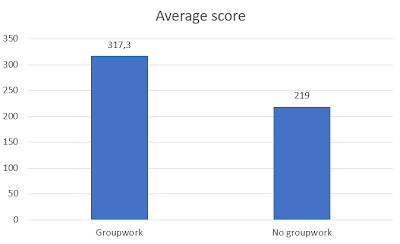
The beauty of the Curatr platform is that you can form groups to monitor and compare the performance. For example, we compared participants with group work with the other non - group work participants. Progress is measured in points. The group people clearly got more points.
The mean score of the participants with group work was: 317.3
The average score of the participants without group work was: 219
It is an indication that group work helps to keep up the engagement with an online course. This may be chicken and egg: the participants with higher motivation may be more likely to sign up for group work.
Fortunately, there is also other research that shows that collaborative learning contributes to the capacity for self-directed learning online. Wang et al describe in ‘How does group cooperation help improve self-directed learning ability in nursing students? a trial of one semester online learning that nurses' group work contributes to self-direction and collaboration skills. This helps participants in online learning to plan their own learning activities. I personally think group work works as peer pressure and builds social capital. For instance, in one of my own groups someone became ill and received emotional messages wishing him strength and thanks for his efforts. Such a bond can also be formed in a short time. A second study confirms this 'Does collaborative learning improve student outcomes for underrepresented learner?'. The study found that online collaborative learning compared to a course without led to better results, a feeling of community and less dropouts.
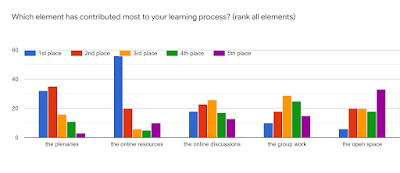
We also asked which learning activities they learned the most from. The online resources, plenary sessions and online discussions score the highest, but there is also a group that puts group work first or second.
Intake, feedback and a certificate also contributed
In addition to social learning and good content, I think there were a number of other factors that helped to keep people engaged. First of all, a good intake and selection. People were asked if they had time (some answered no and were therefore not selected :)) and what their motivation was. The 500 fortunate participants were selected from more than 900 applications. In addition, there was continuous feedback from the experts and some mentors on the contributions. This was highly appreciated and even more feedback was requested. In addition, there was a clear structure with a final weekly assignment: the gateway to the next week. When all gates were completed, people could download a certificate. This was certainly an incentive for many participants.
“Yippeeeeee! On June 30, I obtained my certificate. After trying the last quiz several times, I finally crossed the line. I would like to say a big thank you to the organizers of this course, all our wonderful tutors, mentors at the plenary session and all participants for making the last 5 weeks unforgettable for me, having fun while learning. You are all much appreciated. Lots of hugs!"
“I feel good, very good, because I got my certificate today. My appreciation goes out to all supervisors of the four modules. Mr Erik Slingerland, our mentor, thank you for your tireless efforts to ensure that we complete the group assignments on time. To the course organizers and the entire WCDI team, God bless you for giving us this opportunity. Fellow participants… Congratulations to all of you. WE DID IT!!"
Conclusion
It is clear that collaborative and social learning have contributed to keeping participants engaged in the food systems e-course. The organization and supervision takes time, but you can minimize it through clear instructions and the use of voluntary mentors. Online you have to look redefine participation differently compared to face-to-face. You will never get 100% of participants doing all learning activities. Someone who does not fully participate but does participate in two online sessions can also learn something from this what he / she wants to learn, self-management and making choices become more important. It seems that a percentage of 50% is a good achievement for a large-scale online course.
In January we had a lot of fun facilitating our knowmad MOOC. 600 people participated and we had quite intense exchanges. We received many compliments for the way we facilitated it: personal and quick responses. A social MOOC requires a good design of the learning activities, design of the platform and spacing of activities. I think there were many details in our MOOC that made it a success. If you want to read something about the content, check out mysome of my blogposts about the knowmad.
An example is our online network café and the wrap up with a meetup. It is nice to see that the network café idea and the 'space for informal conversation' have been copied in many other MOOCs. Do you recognize this: sometimes you can not even properly say why you are doing something, at time it is so instinctively or a gut feeling.
Hence it was a good idea of Jos Maassen from MOOCfactory to invite Peter Staal from Bind and myself to exchange about the design of a social MOOC and what you can learn from the way you facilitate a community. There are definitely parallel processes. This conversation has produced an article called: 10 community principes to make your MOOC stronger.
The 10 tips are:
1. Size matters. Keep the MOOC small (couple of 100rds) or work with subgroups in which people with a specific interest can meet each other.
2. Build trust. Under the guidance of a reliable and present moderator, participants are more inclined to share information, to express their doubts, to stimulate discussion, or to ask questions.
3. Develop Tacit knowledge. People in a community share knowledge with each other by entering into conversation, the so-called tacit knowledge. Facilitate a process in which people with similar interests find each other in forums to engage in discussion.
4. Find a balance between 'Connecting and collecting'. In the case of a social MOOC, participants want to gain knowledge (collecting) and get to know new people (connecting).
5. Use Peer pressure. Group pressure is a well-known phenomenon that can also strengthen the learning process. For example, state how many people have already responded or are 'through the gate' to stimulate engagement.
6. Involve experts and key persons in the domain. A cMOOC is not about transferring knowledge from you to novices. You do need experienced people and thought leaders. To make the discussions interesting, it is important to involve the experts and key figures (influencers) in the MOOC besides novices.
7. Allow for reputation building. Once people are together in a group, they build up a reputation. A social MOOC must facilitate that people can also build up online reputation by recognizing contributions or eg through leadership boards.
8. Connect online and offline. In this digital era, the online section is the most important in a cMOOC. But the offline aspect also remains utterly important, arrange for meetups or facilitate that people who live together can look for each other. Incidentally, this can also be looked up online via skype or zoom.
9. Provide public but also private spaces. Many people find it difficult to share their thoughts with a community of roughly a thousand people and prefer to do this in a smaller group or one on one. In this way trust and social capital are built up.
10. A warm but obligatory welcome Important in a new community: the feeling of coming home. A personal welcome and a good follow-up are therefore crucial.
We are working and living our lives more and more online, but within your work as organizational advisor, facilitator or teacher you can still focus on face-to-face activities. There are 5 good reasons to NOT go online:
1. The people you work with prefer face-to-face contact
Many people say they prefer to come together. Ultimately, it is the most enjoyable way of working together isn't it? Who knows you might be forced to really take an interest in a topic through an online process and have to focus on what you want to learn. It is much easier to schedule plain old meetings where you can go lean back and see what will happen. With a bit of luck you don't have to think to much.
2. You like to have your schedule full of meetings, which gives you an idea of control
Imagine that you need to organize online activities, then you should spend more time at your computer. Face-to-face events are preferable because you can schedule them till you know your weekly agenda is fully booked. Online asks more of your abilities to organize your work. You would then have to schedule your work flexibly. That would give you the freedom to integrate your private activities easier into your schedule.
3. Face-to-face is needed to build trust to have real conversations
Real good conversations occur only face-to-face. Online is just a substitute for face-to-face contact, of much less value. The fact that more people are online dating and stay informed via Facebook and Whatsapp groups is crazy. That is only superficial contact, and may not have much impact. Real important conversations and new ideas happen face-to-face and not via chat. Online you would get nothing done and have no effect. Weird that politicians invest so much in their online presence on Twitter! 4. You are not working with youth
If you would work with youngsters, you'd definitely work online. You work a lot with 40 + ers and those people are not online. E-mail is just about it. "Do not teach old dogs new tricks." Fortunately that you work with a relatively older group then you do not have to go online and cope with all interesting developments for new ways of learning. 5. You are not good with technology
If you participate in a webinar is there is always something not working well. All those viruses on your computer. It's a good reason to stay far away from facilitating online. Before you know it you will be responsible for ensuring that the technology is working well. What if something goes wrong then you might be required to help people and to improvise. That's not part of your job, right?
I made my first infographic! It took my about 3 hours, including reading - and I'm very enthousiastic about the power of making an infographic for learning.
Knowledge sharing/ social learning within organization in the Netherlands
Let me first talk about the content and then explain how I did it. I was curious to see how organisations are using online social interactions, particularly for learning and collaborating within the organisation. I see a discrepancy between how people use social media at home and within the company. Here's the infographic (in Dutch) and it basically confirmed my gut feelings. 70% of people use social media in the Netherlands (source: CBS central bureau of statistics), almost regardless of educational levels. However, within organisations the marketing department is leading in innovating with social media. In 68% of the companies marketing is using social media. Only in 34% of the companies it is used for internal knowledge sharing. If organizations are investing in internal knowledge sharing tools, it is shocking to see that only 1 in 3 invests in community management and facilitation. It is as if social exchange should be spontaneous and would not need any attention. 36% of the organizations have nobody for community management and 24% rely on volunteers. This was quite a shock, but also not a shock because it actually confirms what I observe around me.
Sources
Het aantal bedrijven dat gebruik maakt van sociale media van het CBS komt dit rapport van het CBS, Sociale media en bedrijven, 2013
I used piktochart to make the infographic and was pleasantly surprised how easy it was. It had been on my wishlist for long to make an infographic but I have been postponing it for long. What I did is think of a topic of interest to me and write it down on paper (social learning/ internal knowledge sharing in organizations in the Netherlands). I then searched for reports using google and my bookmarks. I always bookmark figures with the keyword statistics, which was now very useful. I found two reports and decided that would be enough as a basis. I read the report and jotted down the interesting statistics (about 6-7 graphs). Then I started playing around with piktochart and chose a theme. The theme I chose had 3 subsections and that helped me to focus. I looked at my figures and chose the 3 most compelling ones telling a story. For me the story was that people use social media at home, few organizations invest in social media for internal knowledge sharing and if they do, they ignore the important role of community management. I also noticed that both reports had different figures but decided to rely on the central bureau of statistics more. Piktochart allows you to start with a theme and adapt it easily, for instance change the background colour. After finishing you can copy the html code to embed it and download the graph.
Ideas to use infographics for learning in (online) courses and learning trajectories
Why I learned a lot is because I had to read both reports and be selective in what figures to use and make a story out of it. Condensing the story and summarizing it made me memorize it and draw my firm conclusions. If you'd wake me up at night I could tell you the exact figures of investment in internal knowledge sharing :). Normally when I read blogs and papers online I have a hard time remembering what it was that I read exactly. So how to use infographics? (some ideas but please add your ideas in the comments!)
Divide participants in a learning course in small groups per topic and ask each group to develop an infographic and present it in a blog or meeting
You might ask participants for an infographic as assignment for their portfolio
You could also ask one group to come up with good literature and another group to make the infographic based upon the literature
Ask each participant to make an infographic on the same topic and compare within the group
Last week I participated in a webinar by ASTD and got spontaneous feedback about Europeans. The webinar title was 'what makes multi-cultural training different?' and the topic was how to facilitate international groups online. One participant shared her observation that European 'are not used to technologie'. If she spots Europeans in her classes all bells start ringing that they should give more support... I recognize the difference as well. I see how most Americans and Canadians easily host a webinar or share all their life and stories online. In the Netherlands, I still see this happening only piecemeal.
It's a bit of a pet peeve of mine "if you don't know how to ride a bike it is always faster to walk" - Suppose as a trainer / consultant you are invited to help a team to improve time management. What do you do? You organize a workshop because you are so used to doing this (= walk). But you could do something different, for example by starting online, organize a game, or smart use of social media during the workshop to invite others (= cycle). Because you don't know how to ride the online bike as a trainer you are going to do so... Although you might if you don't live in Europe :).
A good example from my own practice: I am asked to advise a team with teammembers partly based in Canada and partly in the Netherlands. The question was to organize an afternoon workshop in the Netherlands and then later the workshop could be replicated in Canada under the guidance of one of the participants here. After some period of thinking how I'd prefer to work, I decided that it was important to work with the whole team in order to make a joint learning process and to understand each other better. So I designed two weeks online with a videoconference session with the entire team of 3 hours at the end. I believe that many other consultants would have designed the afternoon workshop the client was asking for... I am convinced this is a much better intervention, with more impact on the team and cooperation.
Are you Dutch and would like to learn more? Join the LOSmakers (a Dutch group) on LinkedIn or participate in one of our activities organised by Ennuonline.
How to use Instagram for learning?
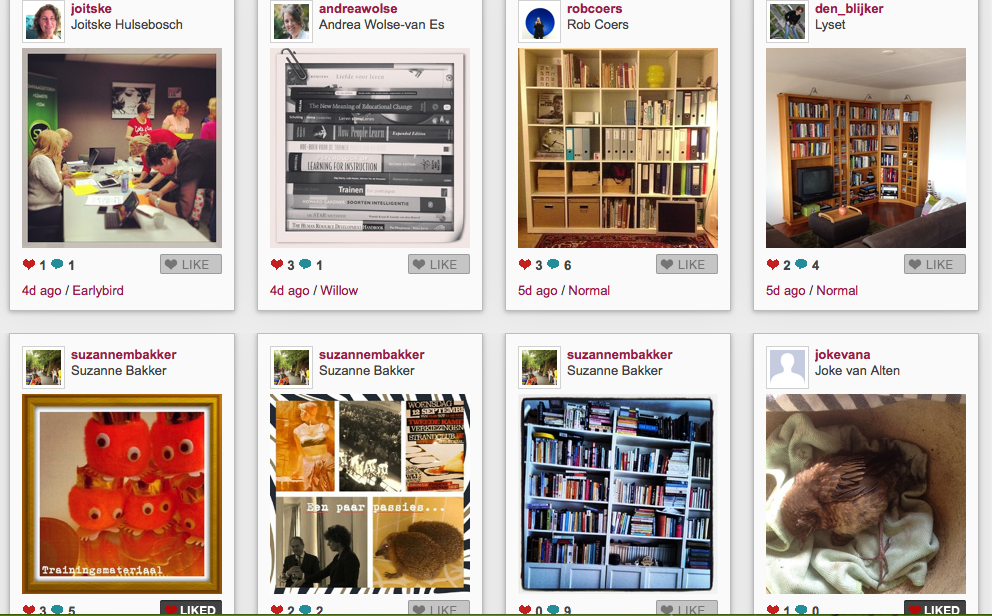
That was the central question for the group of LOSmakers, a group of learning professionals interested in social media. Instagram is a photo app for the smartphone. The LOSmakers had a skype to discuss Instagram and as experiment Joitske Hulsebosch asked everybody to install instagram on smartphone or tablet and to post one photo each day using the tag #losmakers. The photo should tell the other participants something about yourself. Via web.stagram you can watch the pictures via the web and you can also react online, as long as you sign in.
In the Skype 3 questions were central:
How were your first experiences with Instagram?
What are the pros and cons of the tool?
How could Instagram be used in a learning trajectory or training?
How were the experiences with Instagram? Theexperienceswere very positive. Whatstruck me wasthatprettysoonagroup processdeveloped, because peopleadding commentaries and also responded by their choice of pictures. Withouttypinglongdocumentsor introduction youstill got apicture of theother participants.Theimagestickled the imagination. What happenedwas thata picture ofonepersonled tothe emergence of aseries of photosonthe sametheme, we had the themes 'books' and 'fear of heights'. For instance, one of the participantsplaced apicture of herbookcase, which otherparticipantsfollowed. It was concluded thatwe allare activeonline, but fortunatelyalsocherish our bookson paper.The participants quite regularly look atthepictures of theothers, which wasfueled by akind ofcuriosity and being drawn into the exercise.Thehashtag(#losmakers in this case) was important becauseit wasthe binding factor. It feltsafeto share an imagewithout(much) wordsto tellsomething about yourself.On the other handit waspartlyperceivedas unsafe, becauseeveryone can seethe pictures.One participantsaid,"I chose different images because I knew the picturesarein apublicplace". Ifyour photoson Instagramisprivatethey areunfortunately notvisible whenotherssearching onthe hashtag.
Pros and cons
What are the pros and cons of the tool Instagram? The app is very easy to use without any instructions. Via 'discovery' you can easily check whether there are any new pictures with your hashtag. The power of instagram is that you only use images (with short commentaries). It is very easy to share the pictures on other platforms too, for instance to your facebook account. You can use web.stagram or wegram to watch the images online and add commentaries if you wish. Via de app Instacollage you have even more options to make photo collages.
There does not seems to bea separate appfor the iPad, but the iPhoneversion workswellon the iPad. You just have to make a conscious choice whether you wantan open orclosed profile. If you have aclosed profile, then yourpictures(even though they have ahashtag) will not be visible toother participants, unlesseveryone acceptsyouas a follower. That's quite cumbersome process, to make sure everybody follows everybody, hence following a hashtag is much more convenient, but then you need to have your profile public.
Amajor drawbackis thatyoucannot create a group. Of course you canswitch to otheralternativesas a privateFacebookgroup, ora privateYammergroup. But, you'll benefitlessfromthe power ofonlyphoto sharing, the instagram experience.
Most important is that you'll have to considering whethereverybody can easilyparticipate because you need a smartphone or tablet. Though you canview thephotosand respondthrough websites likeweb.stagram the participation is different. Furthermore, if you have another platform for your group, how open will your participants be to create an instagram account? Hence you may check upfront how many have a smartphone/tablet and already have an instagram account.
How to use instagram in training and learning trajectories? The participants in the Skype brainstormed about 4 ways to use instagram.
as a getting to know eachother exercise
as a ramp up to a discussion about any topic (face-to-face or online in a webinar)
as entry to share your practice
as means to reflect / evaluate
The getting to know eachother exercise was our own experience and worked really well.The use of images was very powerful. The great thing isthat with aprompt to placeyour photosaboutyourself, the choice is yours to determine what you show and how personal you will get. The images stimulate imagination and questions. In our case it was a very creative process.
Instagramcan beused to startdiscussions.For example, todiscuss the topic'innovation', you mightaskparticipantsto shareplaces thatthey associate withinnovation.In afollow-up sessionyou can thenelaborate onthe pictures andassociationsthat are made. Again, thestrengthofInstagrammaketheuseoftheimaginationandassociationsofpeople, thenitoperates in the samewayastheworkingassociationwithtickets.If youask fora weekevery dayto puta picturepeopleproperlydealing with the subject.
If youwant to betforparticipantsto give each othera lookinto their daily practiceyou can askto photograph some partsof their worklife.This canbea picture ofcolleagues who give youenergyorfor mechanicsspecialproblems you bump into examining engines.
FinallyInstagram can be used to reflect/evaluate.An examplethat was mentioned was asking serviceengineersa photofrom their workplacelocations which need improvement. That waythey canexchangeexperienceswithservice engineersin other locations.
The conclusion of thediscussion is that Instagram is a toolthatcan be a used very productively inlearning and training, provided that the thresholds for theusers are nottoo high.
Do youhave any questionsafter readingthis blogpost ? Do you haveadditional ideasto useInstagraminlearning situations? Leave a comment if you wish!
With a group I explored the creative use of video by trainers and facilitators. Nowadays it isverycommonas trainer or facilitator tosearchYoutubevideosand usein presentations. But what more can you dowiththis medium? Are there anycreativeforms? We experimented with voicethread. One of us started with a presentationrecorded withscreencast-o-matic.Voicethread is a paidtool.For$ 4.95you can upload3 videos. Theexperience is they are very helpful. Below you can watch our experiment in a.. video! A few observations about voicethread Participantsthink this a fun, interactive tool. In thiscase were used as the central contentof the voicethreadavideo, butitmay also beanumber of pictures.Ittook us some time to figure out how to see where in the video everybody placed his/her reacion - you can see it when you scroll over thebarat the bottom of the page.Not everyone finds itattractive,it is quite 'angular' anddoes notlook as a very dynamic tool, though opinions varied about the attractiveness of voicethread. It isan asynchronoustool, which means everyoneresponds tohis own time, inthat sense it isnot a substitute forSkypeorgooglehangoutwith videobecausethose are synchronous video conferencingtools. The advantage ofworking asynchronousis that allcontributionsremain visible welltraceable.The technique did not workfor everybody,oneperson's sound was very low. So it may need some instructions how to use it.
Working from the tool or the goal? Working withonlinevideorequires a wholedifferent way of working. You have to search and findthe advantages ofthe medium you use. In a school setting, teachers noticed thata screenautomaticallyattractsattention, and decided to use Prezi rather than powerpoint to make it more visually appealing. Based on thepossibilities and limitation of the chosen technique youmay be stimiulated to design other learning activities.The codein technologyforces youto be creative. By getting to knowthe tool you can slowly make well informed decisions. Atool can limit you, but can also stimulate your creativity to come tonewthings. At the same time there is the eternal dangerthat he whohasa hammer will be looking fora nailautomatically. So stay critical about your choice oftoolsand avoid using voicethreadbecause it seems fancy. The core characteristics ofvoicethreadare its central use ofvideo orphotos,possibility of leaving reactions in any form you like (text, voice, video)andasynchronoususe.
Given the core characteristic - how can you use Voicethread?
To get to know eachother, it is nice to hear a voice or see a face online.
Use it to make sure peoplehavealreadythought aboutthe subject before a face-to-face meeting.
Use it to flip your classroom. You can explain theory in a voicethread and use the face-to-face to practice.
For co-creation. You may jointly develop an artifact or plan.People cankeep addingthingswhenever they think of some new ideas to add.
Center your voicethread around aquestionand askinputfrom othersand allow people to reactto each other.
Film criticalprofessionalsituationsand ask people to observe and respond.
An interactive online learning trajectory for the Ministry of Foreign Affairs A blogpost written in collaboration with Charlotte Staats, Sibrenne Wagenaar and Robert Dijksterhuis
When you think aboutAfricado you think aboutlions, hunger, poverty and war? Africa is one ofthepoorestregions in theworld, while Africa isthe continentwith 6countries in the top10 fastestgrowing economies. Withinthe Ministryof ForeignAffairs, it is importantthat officialsdealingwith Africahaveactual knowledgeofthis continent thatis developing rapidly. Atraining dayiseasyto organise, butpotential participants forpreciselythis subjectworkat embassiesaround theworld... How to supportorganisational learning in this case? Fortunately,modern technologyis making it possible nowto remotelycommunicate with one another. TheLearning and DevelopmentDepartmentof the Ministryof ForeignAffairswasthis timeconvinced thatonlinelearningshould be organised. E-learning?Anindividual learningapproachwas not favored and besides, current developmentsand policy issues are changing constantly, think of the fact that we have a new government in the Netherlands. Experiences with traditionale-learning modules have shown this approach is too static, videos, descriptions andassignments. In the case of"The New Africa" however, it wasof great importanceto be able to adjust contenteasy and to co-create new insights with the specialists in the Hague and the embassies.
Online, interactive and up-to-dateIn 2011, the Ministryorganized a training dayon'the NewAfrica': 1 trainer, 20 participants, a physical spaceand aclear programofpresentations, assignments, dialogue andtwo case-contributors. Theday was wellappreciated. Butlooking at thepotentialaudienceit seemedvaluable totry and offer this trainingonlineand at a global scale. To this end, the Ministry organised a four-weekonline training.Important principles:
easily accessible online from all over the world;
Participants workwithin theirowntimeto the training, within certaintime period;
Group assignmentstopromote the group feeling and engagement
Once per week a synchronous activity to stimulate dialogue and engagement
Contenteasy to adjustdepending onlearning needsof the group;
Objectivesto be achieved throughdiscussion andinteraction
Alsoavailablefor localstaffat the embassies: in English.
Design of the online training
We used Moodle as the main platform, it is an e-learning platform already available within the Ministry, however, it had never been used interactively. An important advantage ofMoodleis thatthe onlinelearning environmentis quite easilyto adjust without having any specific ITexpertise.The teamconsisted of: a content expert- the strategic policy adviserAfrica, an adviserLearning and Developmentfromthe Ministryandtwo external onlinefacilitatorswho have experiencewith online learning (myself and Sibrenne Wagenaar).
We found itimportant to offer aclear structure:whatis the theme, what do we askfrom participants because participantswerenot accustomedto onlineandself-directed learning. The designwas eventually composed offour weeks, witheach week having aspecific theme.Each weekstarted on Mondaywith a 10-minute explanation by video by the content expert.Participants couldthenexchange questions and ideas with each otheron the forum.On the secondday of every week there wasa lightexerciseoffered,such as aquiz wherethe participantswere given a particulargraphand had to guess what the graph was about. Thethird dayof the week was reserved fora webinarat a fixed time. Thiswebinar had a guest speakerfrom practice.The webinarswererecordedsoparticipants whocould not attendthe webinar could watch them afterwards. In addition to theweeklythemes, the participants worked ingroups on aspecific theme of interest, during thelastwebinarthey had space to present their findings to the rest of the group. And how did it work out? A design is always beautiful, but practice is more complicated unfortunately :). A call via the communications channels of the Ministry got a number of 45 participants registered. An excellent start when it comes to interest for this new type of learning, compared to 10 to 15 participants who come to a training day in the Netherlands. Ultimately
30 of the 45 participants (a third from embassy, a third from the Ministry in The Hague
and a third from AgentschapNL) participated very actively during the four weeks online. Organizing
the webinars took quite some acrobatics - because of the firewall
of the Ministry and differences in time zones. As a solution we recorded all webinars, the first webinar got 31 views and the first video 78 views. Online learning is very demanding on the self-directed and self-organizing ability of the participants. The
webinars are planned and you can put them in your agenda, but the other learning activities need protected space (time) to participate, which is difficult in the bustle of everyday life. This means that we in the design have deliberately chosen to work on an assignment, a group assignment which calls on mutual responsibility for a successful conclusion. This worked partly. For some it was a good stick and the last 3 days before the webinar a lot of activity was noticed. Others did not succeed in finding sufficient time to engage. In the design and supervision of this type of group assignments we would suggest some improvements for next time. In the
evaluation the trajectory scored an average of 8 out of 10, which is actually quite high for the critical civil servants: "Actually it
was the first time as I had such a course, I would say That it was more
than I expected. It was interesting, interactive and very informative. I
liked it. "" A very stimulating way of taking time to look into eevelopments in the most fascinating continent in the world and
realizing, that you should more often take that kind of time. New developments put in perspective, That invites to further Top reading ". The design was very well appreciated as well as the expertise of the content specialist and the facilitators. At the lower end, someone who gave score of 6.5 for the course. 'Technology takes too much time "and" for me it was unfortunately very hard to combine with my other work. " It remains a challenge to learn and work online.
Successfactors
What contributed to the relative success of this trajectory? One of the factors was cooperation between a content expert from the Ministry of experienced online facilitators. Where the expert was interested in working online, liked to make videos and was involved in the online discussions. The facilitators had affinity with the subject and could so easily think along with the content to offer and questions to ask.Charlotte
Staats, Senior Advisor Learning and Development: "My responsibilities
as an advisor Learning and Development includes the design of
e-learning. If potential participants have little experience with e-learning, it is difficult to determine how and where to start. A breakthrough was the understanding that sometimes you may not
from the task side ("developing e-learning") but on the side of cooperation. I knew Robert Dijksterhuis was inclined to learning with social media and that he was eager to try something new. I also knew that the two external facilitators had a background in the field of Development. And my expectations came tru: the collaboration was a nice synergy, which iyielded a great pilot. "A second factor is that we had a fairly large group of participants worked, resulting in online
discussions sufficient "mass" was to really make something happen. A
large proportion of the participants worked at an embassy, and this
group, perhaps because they are quite used to it, had a high tolerance level
for technical problems. Robert Dijksterhuis, content expert: "I thought it was a great challenge to start this online training. When
you are dealing with a group can see your audience and during your
presentation you adapt your speech to the reactions of the participants. This is not possible while preparing videos. This
meant that we had to think longer about the presentations, the
exact content and the possible questions that they could evoke. Once started, it was very interesting to see the discussions of the participants in the online environment. Nice to see that there really was extensive interaction, including space for critical reflection and deeper discussions. One
advantage of online was that more people could participate in the
posts, including local staff who rarely if ever participate in training in the Netherlands. Feedback from their daily practice was the route more depth. It would not surprise me if participants would remember this content better than after a days training, partly because it is offered in smaller chunks" Charlotte Staats:" Most important was how the participants experienced the end result. I
received many enthusiastic responses ranging from "Finally a course
tailored to the embassy! 'To' I learned more online than I
thought." I
think it was mainly the accessibility of the learning environment and
the availability of teachers and facilitators which were the success of this
pilot. ' Tips
for your own design If we could do this online training again, we would
have keep many of the design elements: clear rhythm, online discussion,
substantive startup, facilitate working in groups. Looking back, there are also improvements to suggest. We formulate them into the tips below.
Make explicit that there are different ways to participate online. From very heavy involvement to lurking and reading only what you can use for your practice. Participants
felt guilty if they could not participate online "Sorry for the silence but I was in the Netherlands and still have no
blackberry / access to email." "Unfortunately I came only yesterday at 1
am home the
airport. Online learning is different and thus makes
it possible to invite different levels of participation, as in communities. A condition is that there is a large group of participants (30 +) so that there is sufficient activity.
For
people who participate in a webinar for the first time a lot is happening at once: a
conference, a presentation and a chatbox to watch, including the
technique which occasionally fails. Attention
to this aspect remains important: use the same tool every time, appreciate
that everyone succeeds participate, facilitate very clearly all interactions, and during the webinar make a clear distinction between talk about content and
technology.
Working online in groups deserve extra attention. It
allows participants to get to know each other better, and that creates some responsibility. However, it
is important to think about the guidance of this group work: to ensure
that group members quickly find eachother and take off, facilitate online decision-making processes as
much as possible, plan synchronous meeting moments topdown for the groups.
To end an amusing anecdote of one participant: "I'm going to miss the weekly video on Monday! I really looked forward to it watching the video... while enjoying a cup of coffee! Good start of the week that was! "