In my blog I share about learning design with technology, blended learning & knowmad learning. I started with a focus on communities of practice. I share personal experiences, articles and cases.
Since January I have been testing four habit tracker apps - apps that help you develop habits. Do you you firm resolutions to lose less time on your phone, loose your corona kilos? Or intend to run three times a week instead of barely once? These four these apps can help you build your new routines. The apps work for a variety range of habits. You may think that these apps mainly help with healthier living, such as exercising more or losing weight. That is certainly not the case. They can help with new habits such as learning more, reading, more active networking of playing guitar. Besides the fact that these apps can help you yourself, they are also great to use in a training or trajectory in which you help participants with new routines.
1. Streaks
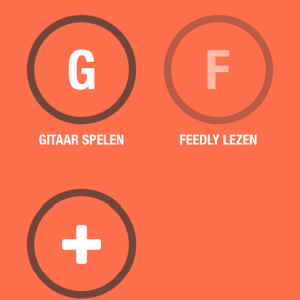
Streaks is a free downloadable app, for Apple and Android. The great thing about Streaks is that it's super simple: you download the app, click on the big plus to add a habit and you choose a frequency. After this you have to record your habit by clicking the circle each time you've performed. What's great is that you can link Streaks directly to your pedometer so it automatically keeps track of your steps. The app is called Streaks because it encourages you to stick with it and get a streak. You have to persevere every day or you will break the streak. I have to admit I have gone out for a second short walk to get my extra 500 steps :).
2. HabitShare
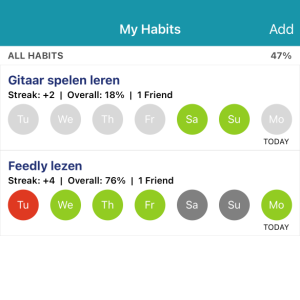
Habitshare is also free and very easy to use. You can write down your activities and how often you want to do this activity, daily or weekly and which days per week. The advantage over Streaks is that you can add friends and invite them to follow a habit. You can also chat with your friends. It does work as a stimulus if you get notifications from your friends. Their slogan is therefore "habit tracking just went social". The app is available for both Apple and Android. Here you will find more info and reviews. Four stars and not five because Habitshare does not look as attractive as Streaks.
3. Fabulous
Fabulous is an app with beautiful design. This app is not free. It costs $39 a year. You can try it for free for 7 days and after that I got another month for free. The app is based on behavioral science - from Duke University's Behavioral Economics Lab by Dan Ariely. It works slightly differently than Habitshare and Streaks. You indicate which areas you want to work on, eg your health or study habits and then you receive tips for habits. For instance, I choose health and had to drink 3 glasses of water in the morning. You can also participate in all kinds of challenges. It is a nice app if you dive right into it, there are stories that you can listen to, explanations and a community. Three stars because it is so beautiful but quite complicated and not free.
4. Habitica
Habitica is an app which is gamified. Their slogan is therefore "Gamify your life". You can create an avatar of yourself. I unlocked a sword, chocolate and candy. Unfortunately it didn't work for me. I didn't quite figure out how to put my tasks in the app. But if you like gamification it might be a nice app. One star but as far as I'm concerned because I didn't get into the Habitica mood. Freely available for Apple and Android.
Nukshuk - has a nice story. The name comes from the Inuit who use stones to help each other remember
Moments - both for habits and to-do lists. I tried it once and abandoned it.
A special mention is for Conqueror, an app that allows you to virtually walk the Great Wall of China! (not for free)
My experiences with the habit trackers
I tested the four apps for a month. My intentions were to read blogs via Feedly, walk 5000 steps a day and play guitar. What struck me is that the apps don't motivate you. You must already be motivated yourself :). For example, I had to get used to the idea that I was finally going to play guitar, and I found it quite easy to ignore a reminder from the app. I already have the habit to read Feedly, I wanted to do that more regularly and that made me more prone to respond to a reminder. Besides, you have to get into the habit of using the app.
If you are self-motivated, the apps can help you by:
Formulating your intentions and setting the bar. It helps to make your intentions concrete and to choose how often you want to do something. Streaks also suggests to reduce the frequency if you don't comply. For instance, I've reduced the frequency of playing guitar from daily to 1-2 times a week.
The apps send you reminders at a time of the day that you choose. It helps not to forget.
You can feel peer pressure which may help you perform. Habitshare and Fabulous do this. In Habitshare you can share your intentions with friends, and if they also share their intentions, you will receive notifications. When I saw that my friend Karin was learning Spanish, I felt guilty about skipping guitar. In Fabulous there are challenges and a community that you can join.
You get insight into the numbers. In Streaks you get notifications when you struggle with a task and the suggestion to adjust the frequency. You also see how many steps are still missing in a day. In Streaks you will see great statistics.
Are you getting started or are you fully engaged in introducing new social technology in your organization? It is not an easy task is it? It's tempting to blame the technophobes and people who are not tech-savy. The BUILD framework helps you look deeper into what makes it hard. By the way, when I talk about social technology, I think of:
a Learning platform (LMS type), Moodle with courses or Goodhabitz
You are probably convinced how important the new tech is, and how social & agile & effective the organization can be.. if only everyone would follow the online courses, share knowledge in online communities, work out loud .. and of course embrace the new technology. Getting everyone involved and enthousiast to use the new tech is quite difficult. Colleagues are often not waiting for something new in their busy lives.
I have seen how NOT to do it at an organization that had set up a room for live streaming. This way people outside the room could join in with interesting session and meetings. However, no one knew how it technically worked. It was also quite complex to operate the system with two cameras and a recorder. The support technician was difficult to reach. There was no talk or brainstorming done about the usefulness of live streams. The room was mainly booked because the chairs and tables were attractive :). I suspect that the technology in this organization no longer exists and that it has cost a lot of money.
Don't blame the technophobes
This is a funny video with the current king of the Netherlands setting up a videocall with his mom. It is quite recognizable for anyone with older parents or grandparrents... She acts quite technophobe.
A technophobe is someone who has difficulty or is unable to deal with technology. It doesn't mean they don't like any social technology. They are often using, for example, social media because their friends are using those media.
If introducing the technology is difficult, it is easy to think that it is due to the digital skills of your colleagues in the organization. AARGH. "If only everyone was a little more tech savy..". The challenge, however, is not technophobia. It is much more complex.
BUILDS- Watch the influence of the technology on the users
But if you don't have to focus on the digital skills - what should you focus on? The BUILDS framework says: look closely at the influence of technology on work and the 'business'? What do you gain and lose as a user?
The book Shock of the New is written by Chad Udell and Gary Woodill and explains their BUILDS framework as a lens to look at digital transformation. The framework helps you take a good look at the intended and unintended consequences of a new technology. If you understand this, you can guide the introduction much better with smart actions. Often there are quite a few consequences. The introduction of Yammer in an organization shifted the communication hierarchy. Middle managers lost their control over the information flows. If you don't pay enough attention to these consequences and give the middle managers a role, you can get stuck.
Put yourself in the shoes of your users
The U from BUILDS- is the U of user experience. You have to really empathize with the users for the change to succeed. It seems like an open door, yet we sometimes overlook this step. You know your colleagues, right? Especially the technophobes :). After all, you've been working there for 2/5/10 years.
One pitfall is that we think we know the users, another pitfall is to start thinking about users very late in the process. A change process in which tech plays a key role often starts with selling the idea to management so that there is budget, then comes the selection and purchase of the technology. If the tech has been set up, the project already appears to have been successful and ends. But then it starts.
The plea of BUILDS is to answer the following questions much earlier in the process. This can be done through interviews, group discussions or workshops.
What new ways of learning and working does the technology offer? What does it offer the users? What will make them happy and what not?
To what extent does the technology provide a user-friendly experience compared to what they also use and like privately?
In which ways will users deploy the technology? What changes are necessary? It is great if you can observe what people are doing now so that you know the biggest changes
Develop one and preferably multiple use cases. What is the use case of a colleague? What are the different types of users?
Can the users use the technology in their own way, does it offer this flexibility?
How will you test and set up together with users? How do you keep collecting feedback to improve it?
Make sure you do all this analysis at the beginning before purchasing the tech. Then you know which different groups of users there are. Make sure you involve these people in the vision development. But also when making choices regarding technology, testing and design.
Suppose you want to introduce a social intranet, you could invite a few people (both management and different types of employees) to test three different platforms. This way you can immediately observe how they use it and you can discuss the benefits for everyone, but also the obstacles.
An example: they may find logging in with different passwords very difficult. In that case you can work on single-sign on, so that employees can log in with one password. In this way you ensure that you do not see your colleagues as simple technophobes, but that you understand their hurdles and remove those. The aforementioned middle managers were extensively trained in 'servant leadership' so that their role changes and they can become enthusiastic about Yammer. The don't see it as a loss of control anymore but as an opportunity for new leadership styles.
Even after the launch of the tech, you continue to involve users. At Rijkswaterstaat, for example, managers and employees were offered a platform to share experiences via blogs and Yammer. The board then entered into discussions with them via Yammer in so-called YamJams. Keep an eye on the users and adjust if necessary so that the technology supports their work and does not make it more difficult.
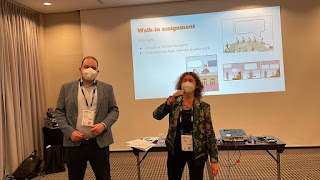
I was really looking forward to the #oeb21 conference in Berlin. I gave a workshop about humor, learned a lot about learning culture and got inspiration and pratical tips for gamification and... we went out dining!! (while that was no longer possible in the Netherlands because of the evening lockdown). Before travelling I could hardly believe I would travel. The Netherlands was in evening lockdown and I would attend a conference with 1000 people? It wasn't until we got on the train that I dared to look for museums on Tripadvisor :). There were fewer participants at OEB due to corona. There were about 650 people and normally more than 2000. There were quite a few COVID measures: you could enter the conference space only if you were vaccinated or cured and you also had to take a daily corona test. Fortunately, that was just around the corner. Together with Steven van Luipen and Ite Smit I gave a pre-conference workshop on 'Stimulating social learning by humour and playful design', I will write a separate blog about our workshop.
What was hot?
The theme of the conference was resilience. Corona clearly influenced the content: there were many sessions with lessons learned from COVID-19, and a lot about proctoring in education. And equipment for hybrid classrooms. The debate on Thursday also focused on COVID with the statement:
This house believes education failed to learn the lessons from covid-19
It was a very interesting debate and in the end I agreed with the statement. Furthermore, many sessions focussed on learning culture, gamification, use of video in online learning. What I did miss was some visionary contributions and trendwatchers. Something about new developments & trends, the role of L&D around fake news or the Metaverse? I am not a visionary myself so I like to be inspired by other visionaries.
Learning culture & workplace learning
I find this topic very interesting, hence attended many sessions related to workplace learning. Stimulating a learning culture means supporting employees to learn and develop themselves, but also collectively as teams and organizations. It is more about guiding change and informal learning than designing learning experiences.
I was lucky that this was the theme of the opening on day 2 with Sina Fackeler from AXA in Paris and Isabelle Mancel from Thales. The interesting thing about Isabelle's story was that she managed to get a decision that all teams set aside half a day a week for team learning. Great to know that there are organizations bold enough to do this! I always hear from people that they don't have time for informal learning and reflecting. An organization that dares to invest in this is wonderful news. How does it work? Each team looks their learning backlog - I interpreted this as a definition of what they can improve and defines learning questions. They call their half days 'learning moments'. Resources are offered, but you can also do a retrospective, for instance visit another team. You can do it individually or with your team. An important success factor is support from higher management.
Sina had designed some sort of trajectory. She is working on a coalition of changemakers - based on the idea that you can change the norm when 25% are convinced but above all show the 'new' behaviour. To get that 25% there was a trajectory “Be the change” and another trajectory for leaders with “Lead the change”. Unfortunately, it was not entirely clear to me how they describe this change, although they did talk about a new definition of learning: learning happens anywhere and anytime.
What I missed in the presentation was technology, you could certainly use an LXP platform supporting a change towards workplace learning. What was also funny was that a survey at Thales showed that 77% of employees mainly learned outside the organization, which shocked them. I was think: great - outward looking professionals!
Laura Overton facilitated a World Café based on lessons learned from a CIPD report titled 'Learning and skills at work survey 2021'. The aim of the café was to looking for effective post-pandemic L&D practice as input for a manifesto. The report consistently distinguishes between organizations with a separate L&D department, organizations where L&D is the task of the HR department, L&D as the task of managers and organizations without an L&D department. The latter appeared to do better on learning culture and workplace learning :).
Another shock for the L&D staff in the room. My simple solution to abolish L&D is of course too simplistic. How can you ensure that L&D is relevant to the core business? In the World Café, solutions were presented such as internships, making sure that managers and employees are always co-owners when designing learning. How do you develop skills? By developing all kinds of training courses or by stimulating employees to remain curious and to learn continuously?
Be in groove with your talents
This is where Jef Staes comes on stage. Many teachers still work from a 2D mindset: from before the internet. We now live in a 3D world where information is abundant. Jef sees learning like this: you have to find your passion. Your own passion activates your talents. Passionate people start to look for information and take action. At that point, you get dopamine. You learn and experience that learning is fun.
Many students have never experienced this and that is a shame. Education should focus more on getting that dopamine experience, because after experiencing this you want to continue learning. Jef believes less in changing people and teacher than in looking for a new type of employee. As a metaphor, he uses the world of silent movies that transitioned to spoken films. New actors were found for this, the silent actors were not automatically good for the art of talking & acting. In the same way, not every 2D teacher is capable of making the transition to 3D education. And they are not to blame for it. That is such a great thing to hear I think of you have a hard time coping.
I'm a fan of Jef's ideas, although he could develop in more detail on how to do this practically. Jef talks a lot about talents, although he also sees that the word talent is subject to inflation, because KFC already advertises with 'We are looking for your talents'. A tip of the veil is: start working earlier, and at the end of your career do what you enjoy, the rest can be done by young people. Waiting until you are 23 to start work is not good, that's not how you discover your own passions.
Gamification en challenges
I missed the pre-conference workshop about online escape rooms, but luckily I did have a conversation with Willi Bernard. That's how I learned he uses Mozilla Hubs to build the escapes. He invites students to built the escapes. On average they spend 30 hours building a 1 hour escape with about 6 puzzles. Want to know more? Download his slides
I did participate in the game about challenge-based learning. In challenge-based learning, students work on complex, social problems from the real world. There is a high degree of self-regulation and people from different disciplines work together. From the examples I liked the example in which students worked intensively for 2 weeks and during these weeks skills workshops were offered, eg learning to pitch. However, they are optional, students choose whether they want to follow these workshops or not. Finally, they present the result to the challenge owners.
We were asked in groups to design a challenge for students to come up with CO2 neutral transport for 2040. The challenge runs for 10 weeks and requires 250 hours from students. This was done by means of a game. We won, yeah! However, it was an example of a game where competition got in the way of the learning objective. The aim was to design challenge-based learning together and to discuss which teaching methods you offer. We played against each other for Lego blocks. We became so fanatical about collecting Lego blocks that we stopped discussing the best working methods at all :). Which would have been very interesting to do because from the cards I could see that they have thought very carefully about this, such as stakeholder analyses, learning to pitch, etc. I will try to get the full list from them.
My biggest lesson is that with a game you have to reward the learning dynamics you want to see, so if you want participants to discuss well and choose the best learning activities, give points for the best design, or best fit of methods, instead of random points. This reminds me that I once gave an online workshop in which my breakouts failed and I had the impression participants learned even more than when they had succeeded :).
Is it Catalonia or Spain? Oh yes Spain! 3 more minutes.... Yes, Spain is good! I hear how everyone is engaged in the game during the mini online escape room. We organized a meetup about online escape rooms for learning and the 45 participants of the meetup start with experiencing an escape.
A great gateway into escapes for learning. For example, you immediately experience how smart it is to build up the information, always small bits of new information. And how important clear instructions are. For example, the first sentence is: 'choose someone from your group who will read the story aloud'. This immediately helps to maintain the group's attention. Tip: do you also want to try this escape room in Dutch built by Monika Theron van het Centre for Innovation at Leiden University. Click here
Escape rooms are hot, also within L&D
Escape rooms have been popular for years, in the Netherlands the DOME from Bunschoten is now number 1 . Only 35% escape from it within an hour. Relatively new are digital escape rooms, with a learning goal. A digital escape room is perfect for more experiential, game-based learning. They can be played individually or in a group. In this blog I'll focus on simple escape rooms. There is of course a difference between extensive flashy designs and escapes that you can build yourself in an afternoon.
But are escape rooms a powerful learning tool or hype? From a white paper by Ijsfontein:
"Several pilot studies have shown that an escape room offers opportunities for assessments and can positively contribute to learning or introducing new knowledge/skills and to repeating or putting teaching material into practice. It ties in with an active learning and working environment in which the emphasis is on experience, application and collaboration"
Escape rooms fit in with the new trends of playful learning, homo ludens and serious gaming, and of course in the old, trusted tradition of active learning.
An example: Mondrian Escapes
Karin Winters of LearningRocks has made an escape about media literacy:the Mondriaan Escapes. The aim is to make teachers media literate in a playful way. The story is that the education inspectorate has been abolished, instead a media literacy inspectorate has been set up. Participants are challenged to decipher an email address of the inspection. To this end, every day a new assignment was placed online. The incentive is that you can win a free workshop. The escape was well received, but it is important to be available during the escape period and/or to give hints and tips. Not everyone interprets the assignments in the same way and you have to avoid that participants get stuck.
The aim is to learn about media literacy. Incidentally, Escape the silence was an example of an online group escape, the Mondriaan escapes an individual escape. Both are possible, depending on your goal. Hybrid forms are also possible: where participants are at the same location, but also get started online via keys with QR codes, for example.
Tools to build a simpel escape room
You can already get started with the tools in your own organization. The two examples use van Google forms en Google sites. These are simple tools which already serve the purpose. There was a question about a platform like LearningStone. Actually you can build an escape room in any platform if there is a function to assess contributions by participants. If you can enter text and questions where you only proceed to the next assignment with a correct answer, you can use it. You can also embed Google forms and sites in your LMS or site. Other tools:
Tips to get started with a simple online escape room
Monika and Karin share their tips to get started. First of all, it is important to get to know your target audience well. It gives you a clue to how complicated/easy it must be. It is not the intention that you first have to be very digitally skilled before you can participate. If necessary, you can come up with something with well-known tools (eg a Microsoft Teams session) and pen and paper. Check out the 10 steps you can take.
Seven more tips:
Start with the goal and come up with a story - your storyline
Be very clear in your instructions
Test the escape room, people can interpret puzzles differently
You can assign roles, for example the role of reading the text aloud
Choose to run the escape with or without a moderator. If there is no moderator, you have to be clear where hints can be found to prevent people from getting stuck. Moderating takes more time, but has the advantage that you can give valuable feedback and help with reflection.
You can also use existing games or modify existing formats. This saves a lot of (thinking) work!
Designing an escape room is a creative process - this is fun to do with a team in a brainstorm
The first step is to formulate the learning objective and to consider the difference between 'need to know' and 'nice to know'. Then make up the story. In addition, you can also google what already exists and you can use without developing it yourself.
.
How labor intensive is it to develop an escape? And how do you make it more than a gimmick?
It doesn't have to be labor intensive - it actually involves turning your learning materials into puzzle form. Instead of flat questions and quizzes, it becomes a puzzle. This of course takes time, but it is a lot of fun to do. You can use the escape room for multiple groups / years. Another tip is to have students build the escape room. The next group of students can then play the game.
How digitally skilled do you have to be as participant? When to use it for learning or use an alternative?
You have to take the level of digital skills of your participants into account and the goal. If the online tools get in the way of the learning process, it is better not to do it, or to simplify your tools. Suppose the goal is to get to know each other, then you can perhaps get to know each other in a different way in a game. You can also opt for simple tools, such as using pen and paper.
The tool of the month is Flipgrid, a handy app for sharing videos within a blended training or online event. It wasn't love at first sight between me and Flipgrid. The first time I tested Flipgrid I couldn't figure out how to easily invite people without the videos being public. I added everyone one by one by email and found that quite a hassle. Only later did I discover that you have to create a group and create multiple topics (to which people respond with a video) within the group. If you set up a group you can invite people very easily with a simple code. Further on in this blog post you will find an example of what such an invitation looks like. But the love has grown! I now use it regularly. A very simple way of using Flipgrid is to ask participants to introduce themselves via the app with a short video. Super easy and fun to see everyone before a meeting o workshop!
So it takes some effort to know how Flipgrid works, but if you have mastered the tool you can do very nice things with it.
What is Flipgrid?
Flipgrid is an app in which participants can easily record and share a video message right from their smartphone. They click on a big blue button with "Add response", which gives access to the camera and microphone and off they go. What makes Flipgrid fantastic for me is that you can set how long the answer can be, eg 1 or 1.5 minutes. What's also nice is that you can comment on the videos by text. Here and here you will find two great explanatory video's. One by Richard Byrne, the other by Flipgrid.
Three ways of using Flipgrid
Flipgrid to get to know each other. You can use Flipgrid before you give a training session or (online) workshop. Ask participants to share what they want to learn, or introduce themselves. As a facilitator, you have a richer feel of your participants: face, voice and learning questions. Add a light-hearted question if you like, such as 'what made you laugh out loud this week?'
Flipgrid for groupwork harvesting. I regularly use Flipgrid for group assignments, especially when the group is working together online for 1-3 weeks. I ask them to record a flipgrid video with their harvest in 1 minute. It helps the group condense their findings. I will show the videos during the (online) meeting. This way the presentations don't get boring and I know exactly how long it will take. You can make use of Flipgrid's mixtapes which is a feature which allows you to show a number of videos in a row via one link.
Flipgrid for presentation skills. You can of course use Flipgrid to practice presentation skills. I used it to let participants practice a pitch. The advantage of Flipgrid is that participants can re-record as many times as they want. I showed the pitches during a live online session. All participants gave positive feedback and tips via the chat, but you can of course also ask to give feedback online in Flipgrid, or give feedback yourself as a trainer.
Example Flipgrid instruction
How can you share your story?
Download the Flipgrid app from the app store: Android or Apple You will be asked for a flip code. The code is: 34xx5z
Follow the steps to record your video. Click on Add response, log in with a Microsoft or Google account and start your video.
Your contribution is approved by me. So don't worry if you don't see your own video right away, I'll approve it as soon as possible. If you have any questions, you can email me.
What can go wrong?
It happened to me twice that Flipgrid didn't work properly, or better said: my exercise didn't work properly. I used it once with a group that didn't know each other well and I asked a quite complicated question. There were only two responses. With another group I was eagerly looking every day at the Flipgrid app on my smartphone, but no videos appeared. What happened? Flipgrid had changed the default settings to moderation. There were contributions, but as an 'educator' I had to approve them first via the website. Unfortunately you can't turn it off. Oh yes there was a third exercise with few responses! I was depend on other to send the invitation and they sent on the day of the live session, hence we had few responses. So the lesson is to use it only when there is space and energy to invest in downloading the app and record.
Making a clip
There is a new possibility to make a screen recording in Flipgrid: a recording of your screen as a video. You can use this feature to make a knowledge clip showing, for example, a powerpoint on your computer screen. This feature is a bit hidden but in the video below Richard Byrne explains exactly where to find it.
Translation results
What about Flipgrid and privacy?You can choose settings to guarantee privacy.For example, you can choose that only you see the videos. GDPR wise it must be clear who can see the videos and what the purpose is.It is good to delete the videos after a certain time. Personally I think it is better to use Flipgrid than Whatsapp for sharing videos. First, because you can set the time and subjects. Secondly, because with Whatsapp you cannot prevent people from receiving continuous notifications. With Flipgrid people are more in control when they watch new additions and it is not mixed with private messages.
The big challenge with large-scale online courses (100+ participants) is to keep people engaged. It is easy for people to drop out: due to urgent matters on their to-do list, due to learning assignments that do not exactly match their learning goals, due to not understanding the platform…. Offering the course for free does not help either: the threshold for participants to register is very low, but equally low to give up. Collaborative learning can help keep people engaged and motivated online. In this blog I motivate my experiences with the food system e-course.
In May I was asked to design and facilitate the free food systems e-course together with Wageningen University and the Netherlands Food Partnership for 500 participants from all over the world. I immediately thought this was a super fun assignment. Such a large and diverse group! I saw it as my personal challenge to ensure that the 500 people would remain active, and that they would also apply the food systems thinking in practice. It was a 5 week trajectory: 4 week with a food systems theme like 'Why does a food systems approach matter?'. Halfway through there was a catch-up week. The time investment was 16 hours.
I have chosen to focus strongly on collaborative learning. This consisted of group assignments with the ultimate assignment to write a joint blog. An expert jury selected the best blogs and the three best were published. This collaborative assignment was an important factor in keeping people active and has been highly valued. Some spontaneous reactions online:
“Here we go Group 17- the “Food Ambassadors”! I am delighted with the dedication and respect of our members, thanks to our team leader”
“My Group 1 colleagues: it is good working together with everyone. Thank you Yvonne for expertly leading the group. Let's keep up the good spirit”
“Group 8: It was a great trip!”
My own experience as drop-out
I participated in the Learning Experience through Design workshop of NovoEd before the holidays. I really wanted to finish this one. I really looked forward to it, had quite some time and a good motivation: I wanted to work on my own case: a new learning experience. Yet I gave up. I had to get used to the platform. I wanted feedback on my case and signed up for a group with the idea of getting feedback, but there were 100 people in this group so I did not gain connections. I was deeply ashamed when I saw a month later that I did have a comment! I didn't see this because I didn't get a notification. I had a positive boost when my work was shown as an example during a Zoom session. Then I went on vacation and dropped out. So you see that there can be a lot of drop-out moments. Could I do that better through collaborative learning?
Did we succeed to keep people engaged in the Food systems course?
Not 100% but 54%! The course had a total of 558 participants who were selected to participate in the course. Of these participants, 299 completed the e-course and obtained their certificate (54%). I am very proud and satisfied. This is a high percentage compared to other large scale online courses. Research by Katy Jordan shows that in Massive Open Online Courses (MOOCs), the completion rate can approach 20%, but most MOOCs have a percentage of less than 10%. Some MOOCs are larger and scale up to 50,000 participants, I can imagine that lowers the completion rate.
Is the glass half full, or half empty? Maybe you also think 54% is low? I regularly work with people who have less experience with this type of online trajectory and find 54% very low. They compare it with face-to-face training where completion is almost 100%. Online offers much more flexibility, maybe someone will learn a lot by participating in two of the four modules and only following the resources that are relevant. In other words: in doesn't mean the 46% did not learn anything.
How to measure success?
Success can be measured in several ways: by observations and measurements- and measurements can be clicks or surveys. We had a weekly barometer - a short survey to get feedback. When interpreting your findings it helps if you can compare it with other online courses.
1. Observations. People reacted super enthusiastically, gradually there was more and more reaction to each other.
“During this course, expectations were exceeded. I am very grateful to be part of this community of scientists and mentors. The facilitators were great and very rich in knowledge sharing. Thanks again WCDI!”
“Thank you very much to our supervisors. You guys were amazing to share with us so much knowledge that you bridged my knowledge gap. I am eternally grateful to WCDI for this free, customized training. To my fellow participants, thank you for connecting and hopefully we'll keep in touch. Karibu Tanzania”
“I enjoyed the modules and how they were designed. I have learned and make good use of the knowledge gained. A great appreciation to all supervisors and WCDI. I look forward to collaboration between some of the resource persons and myself in the field of food safety and biotechnology. Thank you very much!"
2. Measurements. Engagement can also be measured quantitatively. The first week there were 3,800 responses, but the other weeks there were even more – above 4,000. There were between 180 and 280 participants in the plenary sessions with guest speakers, while the recordings were also viewed an average of 150 times.
46% are dropouts. These were mainly people who did not start, or people who dropped out after the first week. 25% never started the course despite the fact that we emailed them separately a week after the start that they are taking the place of other people who also wanted to join and were rejected.
If you would like to support these people, you may need more personal attention, which takes a lot of time. 22 people who did not start have responded to our survey and this shows that being too busy with work was the most important factor followed by the internet connection.
So what were the main success factors?
An important precondition for involving people: good content – practice-oriented
It may seem obvious, but the content of the food systems course was relevant and practical. The topic of food systems is relevant because of the great challenge: how do we feed 9-10 billion mouths in 2050? An important UN food summit will take place in September. This was the second edition of the food systems e-course. The content of the first edition was developed in collaboration with experts from Wageningen University and an external consultant, all with extensive field experience. Hence, the content was good and relevant. Lots of short, relevant videos and cases and interesting speakers in the synchronous Zoom sessions. The advantage of a second edition was also that the core team was well attuned to each other. In this case, the experts were really practice-oriented, which was a big advantage. My role was to refine the questions and to organize collaborative learning.
Collaborative learning as part of a broader vision of social learning
Collaborative learning was part of social learning. Other components were forming a group feeling, building trust, and learning from each other. We have used the Curatr platform within StreamLXP. This platform is developed for social learning which facilitates online exchange. There was a network café where people introduced themselves and placed themselves on a worldmap.
“This map is so cool! It's nice to see three others from my country on the course."
The network café was also open to people with a call for collaborations or advice. For instance:
“I am working on a book proposal focused on the intersection of urban agriculture and forced displacement/humanitarian crisis. It will largely focus on case studies from the field. Given the wealth of expertise in this e-course, I was wondering if you have come across any projects in your work focusing on gardening/agriculture for refugees or internally displaced persons (IDPs)?”
Another way of social learning was through the open space. After the catch-up week, we started an open space area online with important themes that emerged from the discussions by participants. We also asked a number of participants in a Zoom session to present and discuss their case with an expert.
The facilitation was aimed at creating a group feeling. People with an interesting contribution were mentioned in the emails, the network was made visible by means of a map, but also by making a YouTube playlist of participants' favorite songs. When playing, you become aware again of the great diversity in the group. The playlist was certainly popular, new songs were contributed until the very end and had 1200 views.
Gamification
Last but not least, there were elements of gamification. A leaderboard showed the most active participants- not only the people which reacted a lot but also those whose reactions are valued. At one point it became a race between three participants who started to post a lot of comments and documents with the aim of getting on top of the leaderboard. We wondered how to deal with this, but it didn't seem to interfere with the learning process and it was also funny. What we did though - is consciously reward other people, for example people with a special case or the first with a certificate.
Online collaborative learning for large numbers: use clear instructions and mentors
With 500 participants, guiding groups takes a lot of time. We tried to lower the number and upper the motivation by making it voluntary. During the intake, people could sign up for group work and we made it clear that this would take an extra 4 hours. We hoped for a maximum of 120 people (20 groups of 6), but this 370 signed up! A bit overwhelming but also fun. Many people who had not registered during the intake were very eager to participate when they saw the enthusiasm of the others. We have formed another new bonus group for these participants.
To keep it manageable, we opted for (1) clear assignments and (2) the help of voluntary mentors. Each group had its own mentor – not for content guidance but mainly to help the group organize itsellf and see to it the groups did not get stuck. Each mentor has fulfilled this role differently.
We have chosen to group people by region/language area, so for example French-speaking West Africa together, Spanish-speaking people together. The advantage was that they could collaborate in their own language and did not have to bother with large time zone differences. I personally think that this has been an important success factor, also in understanding each other's context. Especially for the Latin American groups. Once in a while, that didn't work out because a lady from Asia ended up as part of a French-speaking group.
Last but not least, we had the groups work on a real life case of one of the group members. As a result, the first assignment was mainly filled with getting acquainted and choosing a case. This took a relatively high amount of group collaboration time, but ensured the groupwork was very practical and participants could go in depth.
A number of ways in which we have tightly managed the group work:
Four short assignments of an hour with a tight deadline, all assignments were online and were explained again in the Zoom sessions. The assignments worked towards a clear final assignment: writing a blog.
There was guaranteed feedback from experts; but only after handing in the assignment before the deadline
The opportunity to work for an hour in your own group in Zoom every Wednesday after the guest speaker. Many groups have taken advantage of this. The groups were free to choose their own time, however this can be quite some hassle.
In the first assignment we stimulated the creation of a Whatsapp, Viber or Signal group for fast communication within the group. Some groups opted for email as a means of communication.
We asked for one contact person. This made it easy to get in touch.
In the first assignment we asked to choose a name for the group. These became names like “11 tomatoes”, “Simba”, “Asian Booster” and “los Andinos”.
Volunteering for group work worked very well for motivation. Of the 38 groups, only 1 group has not started. There are 34 groups that submitted a good final assignment. However, only 4-6 people were active in each group. I wonder if that percentage would be higher if you formed groups of 4-5 people. The fact that you could win as a group also helped. The groups were motivated to submit a blog, and there was a respected jury and clear judging criteria.
Collaboration learning worked for course engagement: group members progressed further in the course
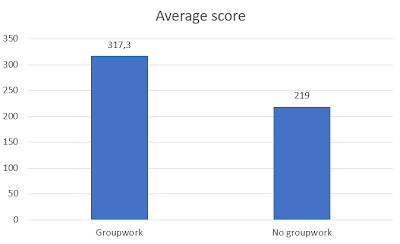
The beauty of the Curatr platform is that you can form groups to monitor and compare the performance. For example, we compared participants with group work with the other non - group work participants. Progress is measured in points. The group people clearly got more points.
The mean score of the participants with group work was: 317.3
The average score of the participants without group work was: 219
It is an indication that group work helps to keep up the engagement with an online course. This may be chicken and egg: the participants with higher motivation may be more likely to sign up for group work.
Fortunately, there is also other research that shows that collaborative learning contributes to the capacity for self-directed learning online. Wang et al describe in ‘How does group cooperation help improve self-directed learning ability in nursing students? a trial of one semester online learning that nurses' group work contributes to self-direction and collaboration skills. This helps participants in online learning to plan their own learning activities. I personally think group work works as peer pressure and builds social capital. For instance, in one of my own groups someone became ill and received emotional messages wishing him strength and thanks for his efforts. Such a bond can also be formed in a short time. A second study confirms this 'Does collaborative learning improve student outcomes for underrepresented learner?'. The study found that online collaborative learning compared to a course without led to better results, a feeling of community and less dropouts.
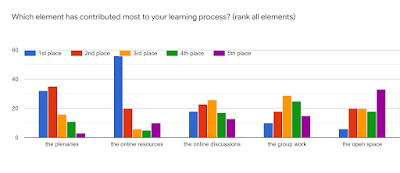
We also asked which learning activities they learned the most from. The online resources, plenary sessions and online discussions score the highest, but there is also a group that puts group work first or second.
Intake, feedback and a certificate also contributed
In addition to social learning and good content, I think there were a number of other factors that helped to keep people engaged. First of all, a good intake and selection. People were asked if they had time (some answered no and were therefore not selected :)) and what their motivation was. The 500 fortunate participants were selected from more than 900 applications. In addition, there was continuous feedback from the experts and some mentors on the contributions. This was highly appreciated and even more feedback was requested. In addition, there was a clear structure with a final weekly assignment: the gateway to the next week. When all gates were completed, people could download a certificate. This was certainly an incentive for many participants.
“Yippeeeeee! On June 30, I obtained my certificate. After trying the last quiz several times, I finally crossed the line. I would like to say a big thank you to the organizers of this course, all our wonderful tutors, mentors at the plenary session and all participants for making the last 5 weeks unforgettable for me, having fun while learning. You are all much appreciated. Lots of hugs!"
“I feel good, very good, because I got my certificate today. My appreciation goes out to all supervisors of the four modules. Mr Erik Slingerland, our mentor, thank you for your tireless efforts to ensure that we complete the group assignments on time. To the course organizers and the entire WCDI team, God bless you for giving us this opportunity. Fellow participants… Congratulations to all of you. WE DID IT!!"
Conclusion
It is clear that collaborative and social learning have contributed to keeping participants engaged in the food systems e-course. The organization and supervision takes time, but you can minimize it through clear instructions and the use of voluntary mentors. Online you have to look redefine participation differently compared to face-to-face. You will never get 100% of participants doing all learning activities. Someone who does not fully participate but does participate in two online sessions can also learn something from this what he / she wants to learn, self-management and making choices become more important. It seems that a percentage of 50% is a good achievement for a large-scale online course.
Sibrenne and I are looking forward to May 20, the day that our book 'Blended learning design' (in Dutch) will be published. It was a happy writing process (18 days in all), but the proofreading was kind of tough. I read the whole book twice and had not really planned this intense kind of proofreading. But it looks wonderful! So I feel relieved that the book is currently at the printing press (ofcourse there will be an ebook too!).
The outline of the book is - organizing the start (with design approaches etc), design, innovative blends, from goal to tools, from infographic to interactive videos (on learning materials), online facilitation and online specials.
The 3P model
One of my favorite models is the 3P model by Chatti, Matthias Jarke and Marcus Specht. The model is developed in response to the changing world of online media and information. Trainers are now 'competing with Youtube' as Hans de Zwart said. Rather than competing, you should make good use of the available sources and use them for pull learning activities. In that way people learn more pro-actively plus you teach them how to network, find and judge resources. Please find my explanation of the 3P model using Squigl.
The 3P model in the water management and policy course
An example: with the 3P model we are developing a course for civil servants dealing with water management and policy, popularly known as the water course. Important principles for this course are:
We focus on the learner, his needs and preferences.
We provide a varied program in which we actively involve participants in the design.
We choose a learning platform that they can continue to use after the process.
You learn with others. We want to focus on getting to know each other, learning from each other and expanding the network.
The process takes three months. 120 participants participate and they are guided by three facilitators with knowledge of the business. The first week they get to know each other on the basis of statements. Participants are explicitly invited to share their own professional practice / experiences. (Participation) Questions are: what is your engagement with water management? Which challenges do you see? What questions do you have? We organize a live session to inventory and cluster these experiences. This clustering helps in the development of elective modules.
This is followed by two months, during which everyone takes a module of their choice. (Personalization) Each module has an assignment in which something must be selected or designed that is useful in one's own practice. The groups themselves look for information. There is a list of experts they can interview (Pull). Each group is also asked to contact at least one company. The process is concluded with a presentation of the products of the groups. The participants also discuss how this group may wish to continue as a knowledge network and who can play a facilitating role in this.
Using Squigl to make animations
I am a big fan of Squigl. Squigl works with text and you search images. There is a library of images you can use and this library is expanding, hence there is is already a wide choice. However, I still wish to draw my own images using my Wacom tablet. You can record your own voice or use an automated voice (which I did since I am not a native English speaker). Do you want to know more about how to use Squigl? Watch this video.
Often when I blog about tools I put a new tool in the spotlight. However, online learning can be rendered more effective by smart use of 'old' tools. That's why this time the tool of the month is good old Padlet. You probably already know Padlet. Padlet is an online brainstorm wall on which you can stick post-its online. I've been using Padlet for quite a few years, from the time it was still called Wallwisher. In fact, I have a privileged position at Padlet. As an early user I am allowed to use the number of Padlets I created in the beginning (20+), while you can now only create three for free. The great thing about Padlet is that your participants don't have to create an account to brainstorm. I am also a big fan of the export function. You get a nice PDF that is also easy to read. Have a look at ehis result from a brainstorm about online humor.
You can use Padlet in many different ways. Below are a number of smart ways in which you can use our tool of the month. If you have one of your own, it would be nice if you add it in the comments to this blog post.
The basics of Padlet
If you are not familiar with Padlet, this video by Richard Byrne is a good way to familiarize yourself with Padlet.
You can use Padlet for all the same ways you would use post-its and a flipchart in a room. You can ask your participants a question and have them stick post-its on a wall or flip. You can do this in exactly the same way online. The twist online is that you can choose whether you want people to brainstorm together in a live online session, or invite people in advance to brainstorm on their own. Sending out a Padlet before the session is best when collecting questions or ideas. In the session you can then discuss or cluster on this. When you first want to explain something, and work on it later, it works to work on a Padlet during an online session.
On to more creative uses of Padlet!
The three step brainstorm
With a three-step brainstorm you build your storm in three steps. Brainstorm first, then ask people to read and like, and then discuss the ratings. Padlet can be set in such a way that participants can also give comments and likes to contributions (go to settings -comments and reactions). An example: I invited participants to post a good blend of online and face-to-face activities. Then I asked participants to read the contributions and give likes. During the discussion I zoomed in on the highest ranked contributions asked for reasons. Together you can thus make a list of the working elements of a good blend. Another example of a three-step brainstorm is to invite participants to post difficult situations, then make suggestions to each other via the comments and finally discuss a number of cases.
The world map
When you create a Padlet you choose a template. One of the template is 'map'. You can use the world map in Padlet to let participants introduce themselves by putting themselves on the map. This gives a nice overview of the group. You can also ask everyone to add specific information, such as their areas of expertise. You can also zoom in on one particular country - see the Netherlands in the image. You can also use the map in Padlet to present information linked to a geographical location. Suppose you want to offer information about climate change, you can add info and link that to the specific location.
Breakout groups
You can also use Padlet well as support for group work in breakouts. In Zoom it is always a struggle to clearly communicate the assignment to the groups, the groups can't take the slide to the chat. Sometimes I say 'just take a picture yourself'. One solution is to create a Padlet with columns (this template is called 'Shelf'. You can use a column for the assignment itself and give each group a column, where they take notes. This is a nice way for you as a facilitator to monitor the progress in the groups. If you see one group's column is still empty you may visit that group.
The mini-course
Microlearning is hot. You can use Padlet as the basis for a short course, for example a ten-day course on 'staying fit in times of corona'. You can use a column per day with a short assignment. You can add a video, podcast or article. Another way is to link multiple Padlets. Start a 'Mother Padlet' and link to the other Padlets. Here you will find an explanation how to link them. Or make an escape room as a mini course.
Padlet in your own platform
There are several platforms where participants cannot interact easily. Or the comments are quite hidden (like in Moodle). You can often 'embed' = insert other content in your platform, like a video. If you can embed a video, you can also embed a Padlet. For the users the experience is seamless, it is as if they are responding in the platform.
Video and audio Padlets
A nice feature of Padlet is the option to record a short video via your webcam. Hence, you can use Padlet in the same way as the Flipgrid app. For example, ask the participants to record a pitch of no more than 1 or 2 minutes and ask the other participants to give feedback via the comments. During a series of digital working visits, we keep each other informed via short video messages. During a project, the presentations were shared via a Padlet and we gave feedback via the audio. That makes it more personal.
Ideas added by readers:
Use Padlet for evaluation: ask people to write down their ideas in different columns. One column per participant or per evaluation topic.
You can add your own image as background. You may use for instance a graph and ask people to add ideas concerning the elements of the graph. You need to use the canvas template for this, otherwise the posts can not be placed on an exact place on the wall.
Do you facilitate an online or blended course? If it takes longer than let's say a day or week, you may be using an online platform. Maybe you are already content that you understand all feature or you may have someone 'doing' the platform stuff. That is a shame because a well-designed and attractive platform is important. So you should be bothered about the style and content of the platform, even if you think there is not that much that you can tweak (what you can tweak depends indeed). In this blog I explain why the attractiveness of your platform is important and will give a number of tips that you can get started with right away.
In this video you see the 'Rapping Flight Attendant David Holmes'. He explains the safety instructions via a rap. Not only musical and fun, but it also turns out to be effective. "This is the first time I have listened to the instructions" a passenger told him. Making fun can help capture attention ... How can you use this with your online platform?
Happy or sad online? The importance of emotions
Donald Norman writes about the importance of emotion in design in an article called Emotion & Design, Attractive things work better. Two elements are important for a great platform supporting learning. First, the attrractiveness - the immediate atmosphere that you experience as a participant on a platform. And secondly, the convenience - the ease with which the participant can use the platform and move around and find their way. Most importantly, the first influences the second: appearance affects the ease of use. A study of ATMs in Japan and Israel shows that an attractive ATM with the same buttons is perceived as easier. Norman explains this on the basis of emotions: an attractive design makes you happier and hence you are more open to finding solutions, for example clicking a few times before you find what you are looking for. On the other hand, if you are in a bad mood, you can keep clicking on something and get annoyed. So you can get away with more problems if it looks nice.
How to make your platform attractive? You can do something about the design, font, color photos. What atmosphere do you want to create in the platform? That probably depends on your target group. Business- like or informal? With hand-drawn images you get a different atmosphere than with photos of well-dressed employees. Blue gives a different feeling than orange. Also play with fonts. And test. Ask participants what they find attractive and what they don't.
Tips for an attractive platform
Make use of illustrations, photos and drawings. Illustrations contribute to the attractiveness and atmosphere. If you have or can hire a graphic designer in-house, he or she can help you develop the style. If not, you can also ensure that you add images such as photos or cartoons. You can use sites with photos such as Pixabay or Unsplash for this. Or use icons such as Nounproject or Iconduck. You may also search for images with use rights using Google images.
Provide a clear structure. A participant enters the platform and must be able to find his way. A good menu function helps with this. You may put a welcome message on the homepage in which you give people a brief explanation. Remember that not everything has to be visible from the start, maybe you can keep a few themes hidden for later? Or do you expand the platform based on the wishes of the participants?
Put the most important thing first. Online you work with lots of hyperlinks. How often does someone have to click to get to the information? This has a great influence on the number of responses to a question, for example. When a question and all answers are visible straight away, this produces many more responses than when you first have to click twice before entering a forum.
Use multimedia. You can work with text online. Such as exchanging ideas and experiences or answers to an assignment in a forum. It can be refreshing to work with other media such as video and audio. When you can "embed" videos (this is placing the video on your platform in such a way that the video plays there too) it is more attractive than a link.
Use appealing language. Language has a decisive role: use recognizable language, but also be creative. Calling a space for group a "bungalow" does something to the atmosphere. Or create a "garden" as a place to exchange ideas, which sounds different from "forum". Using a word like bungalow with a simple image can give the feeling that you are really sitting in a house together.
Make activity visible. Nothing is more annoying than going to an online environment and feeling that little is happening there. A main page that constantly looks the same does not make you curious. Make the activity visible on the main page: tweets, latest activities, a newly started discussion, a posted blog post, an added video, a new link to an article.