Tuesday, May 31, 2011

So many learning style tests, so little time..


I went looking for a learning style test for an online course. I thought a learning style test was a nice ramp up for an exercise where people had to blog about their own facilitator style - from the idea that it is good to know your own preferences and biases as a trainer/facilitator. Hoping this awareness helps you to try to stretch and integrate opposite preferences in your design. I asked a question about learning styles on Twitter and in Jane Hart's social learning community and got some good responses which made me really think! A definition on learning style from wikipedia is:
Learning styles are different ways that a person can learn. It's commonly believed that most people favor some particular method of interacting with, taking in, and processing stimuli or information. Psychologists have proposed several complementary taxonomies of learning styles. But other psychologists and neuroscientists have questioned the scientific basis for some learning style theories (nb: learning may be broader than just processing stimuli or information)
.
How do you notice differences in learning styles?
One of the observations I have with regards to the use of social media is that some people just love delicious, the social bookmarking service, and others don't bother at all after you show them. The same with blogging. For some it really works, for others they try and abandon it immediately. Personally I dislike podcasts, when I listen to them, my mind gets distracted too easily. I also have the impression some people enjoy learning in communities, others preferred structured courses. Is there something in the personality of learners or learning styles that may explain these differences? And how to work with this as online facilitator?

What are the various learning style tests available?
Here's the list of learning/personality styles tests I harvested:
Ofcourse this is a little overwhelming! And there are more to be found in this report about learning styles.
Do learning styles exist and is it helpful for learning professionals?
I found this video with Daniel T. Willingham of the University of Virginia and this blogpost (via Harold Jarche).


Both claim: "Learning Styles don't exist. Everybody knows this except people who don't. Their non-existence is mostly harmless. And occasionally tragic". The explanation in the video sounds convincing for the case of remembering words- learning a list of words does not work better through audio for auditory people or by images for visually-oriented people. So it's correct that people have different preferences, it is not required that teachers use that to adjust their teaching to those styles. The way you teach depends more on what you are teaching (and I'd say depends on the learning experiences you'd like people to have).

Learning styles and the brain
Reading the book 'brein@work' about brain functioning it is explained that the brain is flexibel and adaptive. One of the definition of learning in this book is: "a proces whereby as a result of our experiences and activities changes occur in the brain which may influence our future awareness and behaviour." From all impressions that people receive we can only process a small portion (2000 bits/sec). The thalamus takes care of this. Visual stimuli are the strongest, but you may use all the senses if you want to make sure information sticks. Repetition is important too, and emotions. This is true for any learner, not only for 'visual learners'.

How to choose a learning style test that fits your purpose?
This question arises which test are you going to use and why? Wilfred Rubens suggested to select a test based on solid research, but don't they all claim that?... In the blogpost there's also a link to this solid report about learning styles by the learning and skills research centre (haven't had time to read it in full but scanned it..). It helps to uncover the assumptions about learning underpinning the learning style tests. It adds new tests to the list, but the good thing is, it can help understand the wide variety by pinpointing to five families of learning style tests:
  1. Assumption that learning styles are constitutionally based/fixed (like VARK I guess)
  2. Idea that learning styles reflect the cognitive structure (like Pettigrew)
  3. Assuming that learning styles are part of a relatively stable personality type (like Myers-Briggs)
  4. Learning styles are flexibly stable preferences (like Kolb)
  5. Move on from learning styles to learning approaches, strategies, orientations (like Vermunt)
This is helpful to select, and I tend to go for 4 or 5, learning styles as flexible preferences or moving to learning approaches, like the language of learning. The report also looks into reliability and validity for 13 models. Some are really weak, some are recommended like Vermunt and Entwistle.

I tested some of them- it helps that I'm a fan of online tests.. I must say that several test results resonated with my own observations and helped me reflect on my own preferences. I liked the Myers-Briggs (which is more a personality test) which pointed out that I'm a rational mastermind- more introverted. It helps me see why I enjoy working online (and other might not or less!), and my strength to explain theories in a practical way.

My take aways?
I'm amazed that there are so many different learning style theories and tests! The families definitely help to choose what you'd want to work with if you are looking for a learning style test. I'd prefer a style test that acknowledges the dynamic nature of preferences. It may depend on the situation and what you want to learn what your preferences are. And I don't believe in the auditory/visual/kinesthetic learner difference.

I still think the tests are helpful for learners to become self-aware. You can use it as a starting point to reflect about yourself and think for instance about your pitfalls and strengths as facilitator. Or as a learner- what activities work for you? Do you thrive on certain ways of learning? How to strengthen this? The downside is ofcourse that you fill in the tests yourself (rubbish in- rubbish out!), so some feedback from others may be needed too.

Thursday, May 26, 2011

The dark side of constantly being in touch through social media


I'm intrigued by the power of social media to network. It brings us new ways of communicating and knowing what's going on. As someone who believes in the power of learning from your peer groups (within communities of practice) I see social media offering new ways of connecting with others leading to collective learning. However, there are also downsides to an ever increasing level of being in touch through social media..

Many articles on the internet are sharing the successes of social media like how technology helped in times of fuel shortage in Kenya, how volunteer mappers helped Haiti, or the web2.0 revolution, or how crowdsourcing helps holocaust survivors find answers. Or in organisations: how we use social media to spur employee innovations. All success stories of situations where people have used social media constructively to achieve some goal. Sharing success stories is necessary and useful to inspire others (imitation welcome!) Then there are an awful lot of how to's..on the internet like how to network online, or five tips to separate your professional and privat life online, etc. But there is less written about the dark side of social media...

Let me give you three examples people shared with me. I'm going to make them anonymous because I did not ask permission to share them.

"My daughter is constantly in touch with her friend whose parents are going to divorce. I really dislike MSN and social networks because her friend will get in touch with her immediately something happens. At times upsetting. So this divorce issue is entering my house forcefully"

"I discovered that my husband is sending two girl-friends messages on Facebook for Valentine's day. I'm very upset to discover this... Now I don't trust my husband anymore"

"I followed another professional on Twitter doing similar work as I do. Reading that he got more work and more interesting assignments than I do made me feel bad. In the end I decided to unfollow him."

What do these examples tell us? That openly sharing and constantly knowing from a large group of people what's going on also has its downsides. Maybe the wife was happier if she had not known what her husband was doing (and probably the husband didn't know what information is public and private!). The professional may be benchmarking himself unconsciously through Twitter with others and discovering he is not doing as well as other consultants may be discouraging. Is this openness always beneficial I'm wondering?

And you? Are you happily embracing social media or are you at times feeling bad because of all you discover through social media? What do you do to handle this? And do you feel there needs to be more attention for the dark side of social media? (and I'm not yet talking about political manipulation of social media like in this case)

Tuesday, May 24, 2011

Voki, great tool to use in an online course

I work a lot supporting global networks and online communities of people around the world. I'm always careful with tools that take up a lot of bandwidth (though guilty of using Ning a lot..). Currently I'm also working with a Dutch group of trainers and coaches and now I can use a wider variety of tools and I'm enjoying it.

I am now working with a Voice Thread. Voicethread lets you invite a group to respond to a question, proposition or some pictures via text or voice (audio) or even by a short video through a webcam. Now, I discovered Voki and tested whether it worked in Dutch too and it does!. A tool that allows you to create a character, type text and then have the text read by this character. Click on this character to hear my question of today. Hope you'll like the Australian accent!
I guess you may use it as an online facilitator when you are tired of using your own voice via webcam. You can co-facilitate when you are on your own :).

Tuesday, May 17, 2011

Interactive and engaging webinars- between who and who?

I'm currently using Webex for webinars, unfortunately we discovered (quite late!) that there is a maximum of 7 active microphones, and the first time we had serious problems. Now we found out that we can share the microphones, after people raise their (virtual) hands. Sounds stupid and I feel stupid. You probably think that we should have done a test, but we did a test (with less than 7 people). Apparently nobody realised this maximum of 7. Nevertheless, I don't feel it completely failed because we asked people to use the chat, nevertheless it does feel like a failure for participants. The first webinar probably needs to be technically perfect, might be because of the mistrust they already have for technology? Ironically we had a face-to-face where two people couldn't reach the venue, one stuck in a huge traffic jam, the other in a train which took the wrong track. But that's somehow accepted... Are we more lenient for these obstacles like taffic jam, because we've known them?

Because of the technical obstacles we've not tried out the polling and whiteboard features. So when I saw a free webinar by Gotomeeting on the topic of: 'making your webinar more engaging and interactive' I subscribed immediately. That's what I need to take the next step. The presentor of the webinar was Ken Molay. If you like you can still listen to it here.

A funny discovery was that for me interaction is about interaction between the participants. But in this case interaction was apparently between the presentor and indivividual participants. I had no clue about the number of fellow participants and could not read their replies in the chat. It sounded so smooth that I even thought I was listening to a tape and did not have any fellow participants :). But when I typed this question I got an immediate reply! So it was not a tape.

The webinar started with the observation that webinar participants are prone to start multitasking: check mails, water the plants etc. According to Ken Molay this is hard to avoid. You rather focus on winning their attention back. A few tips to win attention:

  • Talk to participants, use names (get names from the chat)
  • Start immediately with the topic of your webinar and action, that's why people are joining the webinar
  • Don't use introduction slides about your company- too boring!
  • Use pictures and images
  • Tell a story instead of a lot of facts and figures
  • Challenge participants: what did you hear? What did you see?
  • Go 'over the top' with your voice - it may not sound normal in a face-to-face conversations (this probably made me think it was a recorded tape I was listening to!)
  • Use short polls to ask people's opinions
  • Use an invisible behind the scenes team that helps you scanning the chat for questions etc.
  • Make sure participants have to use their keyboard and become pro-active

Though many tips seems kind of obvious, I thought the talk 'over the top' was very original and I would like to try this. Polls are also a good tip and should be part of your design, especially with large-scale groups.

I asked a question about use of webcams in webinars. I have different experiences, showing myself, seeing everybody, without webcam. It is usually quite distracting. Ken Molay felt it depends. When you use your webcam you have to make sure the lighting is good, that you are not looking at your notes constantly etc. So these are important extra things to pay attention to when you use a webcam as presentor during a webinar.

Tip from me, maybe they should investigate: "How to facilitate interaction between participants in a webinar" I'm convinced it is powerful to create an exchange between participants and use their ideas and experiences too.

Wednesday, May 11, 2011

Various ways to use social media as a facilitator or trainer

This is a blogpost written for a half-day workshop for facilitators with Sibrenne Wagenaar.
We thought of starting with a blogpost because it helps us think about the topic of the workshop, it is a light way of starting online, and it gives the chance for others to look over our shoulders (and give tips?).

More and more often we meet trainers and facilitators who are working mainly face-to-face and would like to use the opportunity of social media to facilitate more online because it may enhance the quality of your trajectory. There are many different ways in which you can do so. A great model has been developed by Jane Hart: how to use social media in e-learningtrajectories:


We believe you may also use this model to think about how to use social media in face-to-face learning trajectories.

(1) Wrap-around model: socials aspects are added as extra element to organise trainer- en peer support. An example is using Yammer or Twitter so that participants can have contacts in between face-to-face events, but the core is in the face-to-face.

(2) Integrated model: social aspecten are integrated with the content of the training. Social media form an integral part of the learning trajectory. For instance, when you have an online community platform (e.g. Ning or LinkedIn group) to start exchanging online related to the topics of the trajectory.

(3) Collaboration model: sociaal learning and collaboration are at the basis of the design of the trajectory. The content and topics are co-created in collaboration with the participants. You may be using a combination of social media that are complementary: Yammer for support and contact, Scrumble for brainstorming, a wiki to collect information and documents, a unique hashtag in delicious to build a joint library. It is becoming more of a learning network or learning community.

As you can see: from the wrap-around model to collaboration social media is playing an increasingly central role. Jane Hart warns us that you should use the first model with caution. You need a good reason to use social learning as an add-on, otherwise it is very difficult to make a 'wrap-around' model workable. The strength of the second model is a seamless integration of online and f2f learning. So we advocate to analyse and use the power of both modalities in the design of a learning process. Such that f2f and online learning are mutually reinforcing. Find the right connection between online and face-to-face learning interventions to use the power of various media. In the third model, social media is the basis for learning and participation from a social-constructivist vision.

Important to remember is that the use of social media matches a different perspective on learning as compared to some types of training and 'elearning1.0', focusing on co-creation, self-directed learning by participants and the importance of interaction and conversation between participants. Social media encourage networking, sharing ideas and experiences, collaborate and hence connect so well with this vision. This also means that your role as facilitator is different in the collaboration model from the wrap-around and integrated model. In the third model, you're more of a 'tutor as an equal member of the group learning', your role is to help and create a 'powerful learning environment'. This does not mean that social media can not be used in trainings designed from a different perspective on learning, just that you may have to be aware of this.
Jane Hart's model may help to think about the role of social media in your own training or learning trajectory and making choices therein as facilitator. How central will social media be?

Another model that closely resembles the one of Jane Hart is by Dave Wilkins.
He distinguishes the embedded model, wrapped model and community model. His blog post is worth a read. conversations?

We look around and see a wide variety of learning interventions in which social media can play an important role. We would like to make a distinction between small and large-scale operations and a between one-off learning interventions or prolonged interventions. In a short workshop you will make other considerations when choosing social media usage than a long term project or network, where you can invest in learning to work with a wiki. You may not want to invest in that for a half-day session.

This brings us to the following overview of a number of possible interventions that can facilitate learning using social media. On the horizontal axis on the far left learning activities designed for a small group of participants (eg a training with 12 people), and the right scale actions (think of a conference with 80 people). Vertically, we distinguish between one-time participation (a 1-day workshop, seminar or conference) and longer-term learning, such as a one year learning trajectory or a learning network.


The type of learning interventions will affect how you will make use of social media. Though you can still be very creative and there is no clear guide for doing A, B, C and using tool A, B, C. Some examples:

  • Getting-to-know eachother online: You facilitate a training on brainlearning and want to engage all participants in advance in the subject. You may do so through an online survey, a blog post with the question to participants to share their questions and expectations or invite participants to tweet about their experiences related to brain learning, using a unique hash tag for this group.
  • Conference2.0: You are involved in a major conference on leadership and want to use social media during the conference as a kind of "back channel". Through Twitterhashtag you stimulate people to share insights and questions and a twitterfountain is on screen during the day; visible to everyone. You'll also make a number of flipvideos (short interviews) during the day that you'll make available online.
  • Online follow-up: You believe strongly in the principle of repetition for something new to take root. You will send participant after the training a regular text message containing a question or reminder. Or invite them to stay in touch through Twitter.
  • Webconferences: You work in a multinational company and you want to organize something on the subject of projectmanagement. There is no budget to organise an major international gathering on this issue. Instead you decide to organise a two-days web-conference. You start and end with an open chat session and organizes various workshops during the two days of 1-1.5 hours with guest speakers from inside and outside the organization.
  • Hybrid learning trajectory: You work for a long time with a group of project managers and have an online learning platform (Ning, Moodle, Elgg) designed to promote learning in between the face-to-face sessions. Experts can play a substantive role, participants will work online and give each other feedback on products, there are threads running on the application of new information into their own work practice. The online exchange is as important as the face-to-face exchanges.
  • E-coaching: You have worked for some time with a group of trainees f2f and the meetings are over. Each trainee returns to his duty station and you guide them through e-coaching in applying the lessons learned in practice. For this purpose you use Skype, email and google.docs.
  • Online Learning Network: You want to help people blog. To this end you have an online textbook written with 31 which participants can work. In parallel you have set up a community where users can meet, write feedback on eachother's blog posts and get tips from you as a coach. You facilitate the network to grow and innovate.
  • Blog fair: You want to stimulate thinking about using social media by encouraging non-profit organizations to document and reflect while most of the contacts already have a blog. You invite them every month to write a blogpost about an inspirational question and make the results available via Twitter and your blog.
  • Online community: All over the world policy makers, researchers and practitioners are working on a new approach to forest regeneration. You use Twitter and Ning to foster an online community to exchange in order to stimulate innovation, but also send someone to a conference and ask him to blogging about it. You make the blog accessible within the online community.

Monday, May 09, 2011

Roles in communities of practice

Does a learning community or community of practice need roles to function well? Should you officially assign these roles to people or is it best if people spontaneously fullfil certain roles? What about the self-organising power of communities? On the 29th of March we did a session (we = Sibrenne Wagenaar en Joitske Hulsebosch) about roles in networked learning. We thought it would be nice to share some of our thinking in this blogpost.


Starting with ourselves .... we have a small, starting network of people who all in some way use social media in learning processes and training. Roles are not explicitly named and assigned because it is a starting and spontaneous process. Since we have taken the initiative to invite people we feel more responsible for the ins and outs of this network, but others also take initiatives and propose activities. We talk regularly with members informally, take initiative to convene a meeting f2f, start an online brainstorming, make sure invitations are available for online webinars. But basically anyone can take the initiative to start operations and that happens.
This raises the question ... can it help to formalize roles and assign certain roles to members in a network? And when do formal roles get in the way of spontaneous self-organisation? A more formal roles gives you a certain focus and responsibility that makes it clear how you (are supposed to) contribute to a network. The art in network learning is often this can be combined with other existing work tasks and having a formalised role may help to ensure the learning community doesn't get 'off the radar'. It is crucial that the contents of the network relevant to you and in line with other work you do to prevent the network tasks from falling off the list, but having an explicit role can certainly also contribute.

In this blog post we talk about a learning network or community of practice as a group of people who interact and engage with each other to collectively learn based on a common interest or shared issue and on a fairly explicit manner form a network, offline, online or in a combination of online and offline interaction.

What roles can you distinguish?There are many different classifications of roles in learning networks. The Ruud de Moor Centrum has recently developed a great networked learning toolkit and formulated six important roles, spread over an internal and external focus. There are two more sources that we like to share with you: Eric Davidov's roles and roles described by Michael Fontaine.


Ruud de Moor Centrum (toolkit netwerkleren)Eric Davidove (blogpost)Michael Fontaine (online article)
Internal roles:
1. Coordinator; responsible for planning
2. Inspirator; the creative brain of the network
3. Creator; makes sure knowledge products are produced

Externe rollen:
1. Coach; supports the self-organising function of the network
2. ICT-coach; supports working online
3. Ambassador is supporting and advocating the need for the learning network
1. Consumer: the person who looks for and uses content, information, and social connections.
2. Creator: The person who creates, shares, improves, and discusses content and information.
3. Connector: The person who helps others to find the content, information, and people they seek or need.
4. Carrier: The person who helps creators to transmit and promote their content and information to others.
5. Caretaker: The person who manages the learning community.

1. Subject matter expert
2. Core team member
3. Community member
4. Leader
5. Sponsor
6. Facilitator
7. Content coordinator
8. Journalist
9. Mentor
10. Events coordinator
11. Technologist


We provide these three categories not to compare them, but rather to show the variety in thinking about and defining roles. This is not the 'one right list' that will make your learning network perfect. You may develop your own list of roles for your network, inspired by these lists. It is difficult to compare them because they have been described from different perspectives. The list of Ruud de Moor Centre is based on multiple learning networks in a system in which roles are needed external support. Eric Davidov, based on a literature overview, has compiled the most common roles in a Community of Practice. Fontaine has looked at roles and their development in communities in a number of large organizations. In his view, certain roles (eg sponsor, leader, subject matter experts) are important in the early stages of a major network, and over time find it rather obvious shifts. Fascinating to read his article about it!

Formal or informal roles?
There is a difference between a spontaneous role (eg. act as an inspirator and having a formalised role (eg. as the network coordinator or ICT-coach). It may be worthwhile to formalise certain roles to create clarity and to make sure that the responsibilities are anchored somewhere in the network. Playing with roles may help the development of a network. This is true for a coordinator roles, but also for less obvious roles like inspirator or monitor. For instance, Habiforum has three masterroles innovationcoach, procescoach a coach learning and development, see this article by Kranendonk en Kersten. Do you feel a network lacks innovation power? You may decide to assign an innovation coach.

We are personally convinced that a role should fit somebody's talents and preferences. Are you a person taking lots of initiatives, then the role of activator may suit you well. On the other hand it is very well possible that people play different roles in different learning networks, depending on their identification with the network. This was one of the insights that the participants of our session gained through our discussions.


Which role do you often take in communities of practice? Here is a great test to see what your preferential roles are..

Rollen as a lense to look at the functioning of a community of practice
We strongly believe in the self-organizing capacity of a learning network: people with a shared passion come together, communicate and think of organisating activities to jointly engage in. Does it still make sense to think in terms of roles in learning networks? Absolutely, because it offers a particular perspective to a analyze a network, scrutinize its functioning and think of improvements. What type of members fullfil a certain role? What are the weaknesses of the network? Do we miss a certain role? Discussing the roles thus provides a framework for a discussion on how to support the development of the learning network. Based on this discussion, you could decide to assign certain roles more explicitly to a person or a small group of persons, or to rotate roles. It is also valuable to become more aware of certain roles needed. Following a discussion of the roles within a the network, members might decide:

  • to assign a role to someone (eg. form a core team);
  • to stimulate network members to take up certain role more often based on talent, preferences;
  • to switch roles within the network for example to start rotation for a wider variety of ideas;
  • to us 'a role analysis' occasionally to reflect on the process in the network.

Roles as lense to look at organizations Finally, the conversation on that day also addressed the potential of using network roles to look at employees in an organization. Rather than thinking always in terms of strict functions, you might think of flexible roles. For instance, you might think in terms of changing, flexible topic leadership rather than thinking about management functions and fixed tasks. This might be part of the more networked organizational form of the future?

Tuesday, April 19, 2011

Book presentation 'En nu online'

Last week we had the book presentation of En nu online (unfortunately for some written in Dutch). A bit late, in February we had to cancel it because of the operation of Sibrenne 's son, but it felt good to celebrate the accomplishment. We had a twitter backchannel (#ennuonline) where unexpectedly people who couldn't make it were very active. I hardly had the time to read it, so next time I promise myself to better prepare and plan time for the backchannel.

After an introduction ( prezi) of the three parts of the book: social media for professionals, organisations and facilitators, we had 4 different rooms. People were invited to walk from one room to the other:

The last room was run by me. We used the firehose metaphor to talk about information overload and ways to filter. Suppose you are thirsty, but you only have a firehose, how can you drink? Creative solutions included standing further away from the hose, making small holes in the pipeline so that you can drink from there. Or aim at a wall, so that you can catch the water indirectly. All ways to get the water in smaller portions. Some impressions of the conversations that followed after this starter:

- We all experience information overload, even the most experienced. The overload is not only in terms of information, but also in terms of the high number of tools. Continuously you have the feeling that there may be even better tools out there and that you are not using the best spaces. Important is also the mindset of the people who have grown up without social media. They easily have the feeling that they need to read everything, that they have to catch up with all information in their twitter stream for instance. Let go!! This mindset makes you feel very nervous. If you can let go, you experience less information overload.

- On twitter we asked: what is the most important social media for you? Twitter was mentioned as a favorite. Niel van Meeuwen: "I like to work with Twitter. It is fast and to the point and with many valuable interactions". Hans de Gruijter called twitter: "the miracle of serendipity, find what you have never looked for". Other tools mentioned were Dropbox, Ning, Linkedin, RSS Feeds, iphone, blog, facebook en Skype. Ger Driesen mentions the 'Big 4': facebook, twitter, linkedin and blog. Everyone on the backchannel agreed that face-to-face contact is crucial. Marcel Nooijen: "Face-to-face contact is essential and I'm surprised how social media contribute to face-to-face contact" Bart Bosch: "Twitter helps to connect people and to stay connected. Connection is strengthened by f2f contact and working together." Contact via sociale media and face-to-face contact are mutually reinforcing. Mariel noticed nevertheless that young people don't even know what twitter is. Is Twitter age-related?

- The groups were mixed in exposure to social media. Some wonder: "I'm not on Twitter or Yammer, so why should I start?" People with exposure report that they are really surprised by twitter as a medium for linking and learning. They gain new ideas. Angelica Senders who has recently joined Twitter is surprised by the speed and fun, compared to twitter LinkedIn is a very slow medium. An example was shared about Yammer too. Two professionals discovered they were working on the same issues, and started to collaborate. That can be the added value. For Mariel Rondeel twitter also supports reflection. At the end of the day, you send a tweet and have to think about what you gained, or what was of interest to you.

- A question: Suppose you want to tweet professionally, what should be the content of your tweets? The backchannel people had quite some good responses: Tweet about interesting moments at work, domain related interests, send links to interesting blogs, make sure your tweets sharpen your own ideas. But don't forget to react to other people. And try to find your own balance in sharing professional and more personal content. It is nice for followers to see the person behind the tweets. Saskia Tjepkema shares that she gets often a higher number of reactions on more personal tweets.. And you will most likely be influenced by the people you follow. A good test is the coffee break test: ask yourself whether you would share this with others during the coffee break.

- We also elaborated about the difference between reading books and tweets. Will our brains change from reading tweets? A person shared the example of a book of a frequently twittering person. The book reads like short pieces of text, without a good frame or story. This reminds me of the cartoon of the boy who says he has read only the first 140 characters of a book...Anybody remembers the cartoon?

- A good strategy to filter is to use 'experts', people or professionals you know who work in a certain field. Reading one blog will keep you up-to-date with major developments. You can also filter by sticking to a maximum to follow. A maximum of 10 or 100 blogs, a maximum of 100 people to follow on twitter. A tip is to make a list on Twitter with the people who are important to you, for instance only 20 of the 100 people you follow. By clicking on the list you see their contribution. This helps to stay focused on your network and your 'strong ties relationships'. As someone said "It is better to exchange meaningful with 10 people than superficially with 100". Others wondered why you follow 100 when you have a list of 20: "Why not unfollow the other 80?" The experienced twitters agreed that it is valuable to keep the 100, because of the unexpected links, insights and relationships.

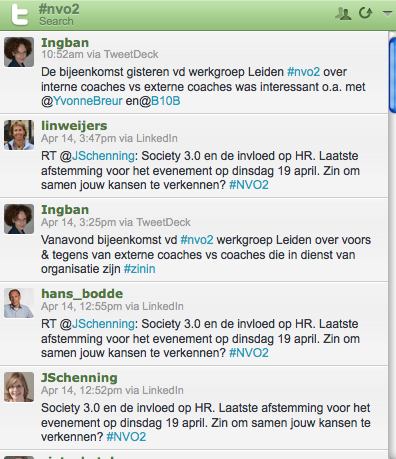
- Tools for filtering. Great tools to filter are hootsuite (or tweetdeck or seesmic as an alternative, for a good explanation written in Dutch see this blogpost). You can set up your own dashboard as a tab in your browser. You can create columns with either lists or hashtags, or even facebook's news feed. This brings me to another great filtering practice: lists and hashtags. Via Twitter you can decide to follow and participate in conversations with a certain twitter hashtags (eg. #lrnchat for learning with social media). This has the potential to create a certain community of people actively sharing around that hashtag. Here you see the hashtag #nv02 from NVO2, an association for HRD professionals.


After the bookpresentation I saw a short video of Jef Staes (also in Dutch, sorry!) and he remarked that people with a passion for something don't experience information overload.. I think that is an interesting angle to information overload too!. Passion gives focus and the greed to learn and digest information.

Friday, April 08, 2011

It's-not-information-overload-but-filter-failure

This quote is from Clay Shirky. A wonderful way of looking at the often mentioned problem of 'information overload'. If I say I'm reading and following 100 blogs people are really shocked and I quickly add that they don't have to. Clay Shirky is turning it around: the problem is not information overload, the problem is that people don't know how to filter. With the result that they don't make use of the possibility to access relevant information and develop connections. Watch Clay Shirky talking if you have time:

He explains that because of the low cost of publishing on the internet everyone can contribute. The web editors and publishers are no longer working as quality filters. This means that the filters sit on the other side, with the users, with us. So we have to filter out quality. This is empowering, but also demands quite some skills.

I've seen the firehose metaphor going round and I really like it. If you are thirsty: how are you going to drink from a firehose? So if we are floaded with information and conversations through social media how are we going to filter?

There are two basic helping frames:

  • Focus on builing a relevant network (the people)

  • Use handy tools to filter ( technology)

Beth Kanter has a good blogpost and developed a diagram (shown here).

Three tips for the first filter: People and Network

  • Make deliberate choices for the number of networks and people you want to engage with. These networks may be formal as well as informal. You can not be as active in 50 networks (I've seen NGOs in Ghana try this!). But through social media you can be active in a few and still scan the other networks. The danger is that you remain in scanning mood throughout. Decide to be active, ask questions, react on forum discussion, blogs etc. Invest in face-to-face contact with your closest networks. If you are busy, don't drop your whole social media engagement but go back to your best network.

  • If you are less busy and have more time at hand, invest in new relationships or exploring new networks too. Make sure investing in new relationship is not at the detriment of your close ties.

  • Evaluate regularly whether your network is working for you or whether you need to shift gear. Probably if you change jobs or focus, you need to refocus, but even in the same job, this evaluation is needed. Unfollow people that are not helping you in any way. Better a small effective network than a large network that makes you lose your interest in social media.
Three tips for filter 2: Technology and Tools

  • Use tools that allow you to scan information and make it easier to get an overview like RSS readers, email subscriptions and tools like Hootsuite. Make sure your start up pages in your browser are supporting this too. You can find more information about RSS readers here. Learn to scan quickly and bookmark things for later reading.

  • Make use of the options in tools to filter out through making categories, for instance in your RSS reader. This allows you to focus in busy times. For instance, in twitter you can create lists of people who would like to follow. I have several lists by type of network.
  • Make use of a blog to digest, reflect and process. A blog is a wonderful way to may sure you reflect on all you have read and scanned. Scanning is not enough, but you need to digest. Personally I use social bookmarking for scanning. Later when I need to dig into a topic a read everything carefully. Sharing your insights through a blog is a nice to share back and be part of the conversation.
There are probably many more handy tools. Share your tips in the comments if you have one!

Finally there is a blogpost with 6 lessons Steffan Antonas. De five lessons I consider to be very important are (read the sixth in his blogpost if you are curious):

  1. Use the tools to build relationships, don't see it simply as information

  2. Prioritise offline contact, make sure you don't waste valuable offline contacts by trying to read up online and keeping an eye on your iphone, computer or ipad

  3. Be open and personal, people are not looking for very dry information, but are also looking for anecdotes, humour etc. (oeps did I do that in this blogpost?)

  4. Stay focussed on your own interests, it is easy to get carried away and waste time

  5. Having many followers are fine, but focus on your 'strong ties' your close network


Enhanced by Zemanta

Thursday, March 31, 2011

Stimulating self-directed learning


We had quite some confusion this week going on about the concept of 'networked learning' during an interesting day with learning professionals. For some this is really about networking online through social media and learning a lot by connecting with other professionals online. For others this is about face-to-face networks focussing on learning together from practice, like a community of practice. I guess it doesn't matter as long as you are clear what you are refering to. Be clear about the definition you use. A definition I liked a lot was: 'discussing difficulties with others, mostly during lunch'. You can simply imagine how this person has the brightest insights by lunching with a group of (self-chosen) colleagues :). Here's a graph with some dimensions of learning networks. If you talk about a closed, face-to-face, problem-solving network you talk about a different animal than when you talk about a fluid twitter community around a certain hashtag. Which is OK, as long as you don't talk about best practices and set fixed steps to nurture these networks. In that case it is good to be more specific. Some people clearly felt that learning networks should be organic and self-organised. I disagree because I think you can do quite a lot to support and grow healthy learning networks. I like to quote Barab: "you can not design communities of practice, but you can design for communities of practice".

Informal and formal learning was also part of the confusing language and I got to realize this is not a helpful language after all. Formal learning gets labelled as 'directive', informal learning makes people think they can't do anything to stimulate it. Though I also say I focus on 'informal learning' I will try to use a clearer language in the future. Learning is not informal or informal, activities can be more or less formal (and I'm sure people using the term want to express that). An example: my personal question is currently how I could learn handy things for my Mac computer. I could learn this through a classroom course, I could learn this by asking questions on Forum on online communities. I could also learn this by going to colleagues who have a mac and are willing to share. The learning is roughly the same process, the activities are participate in differ.

What can be more or less formalized and structured is the organisation of learning activities. On the one hand, a self-structured process whereby nothing is organised. On the other hand a well prepared and structured curriculum. Both have advantages, in a self-structured process the person is fully in control and takes ownership of his/her learning process. In a curriculum people have thought deeply about the field and what should be part of the content. Often trainings are put forward in a caricature whereby the participants only receive information. In reality many trainings also try to link to the questions and experiences of the participants. In between is the interesting area where learning professionals can be creative to stimulate participant-led learning. You can nurture learning communities. Stimulate professionals to blog. Add a coach to a workteam. You can connect people through twitter hashtags. Those are organised activities that try to combine the best of both worlds.

By the way I just found an article about 'emergent learning' and'prescriptive learning'. Might be better terms than formal and informal learning? What do you think?


For people interested in the presentation I can include my prezi. Though the text is Dutch, it is pretty visual too.

Tuesday, March 15, 2011

Book review: the new social learning

I read 'the New Social Learning' by Tony Bingham and Marcia Conner. There was actually less new information than I had hoped for, I missed a deeper layer of understanding how social media changes learning processes. How do social media change individual, team and organisational learning processes? And how to facilitate that change process? Maybe I'm looking for something that doesn't exist :).

Nevertheless it is a comprehensive overview of what is possible with sociale media in organisations. So if you plan to work with social media to support learning and knowledge management in an organisation it is a practical book with lots of examples. Information is organised neatly per chapter around online communities, multimedia (stories), microsharing/microblogging, collective intelligence, virtual environments and the use of social media to support events. The chapters have the same subheadings. My favorite is 'respond to critics'. I fully recognize the questions that critics ask and the book helps you deal with the questions.

A new term I picked up is 'ambient awareness'. It is similar too, but not the same as 'distant closeness' which is more about intimate contact without the need to have one on one contact. The new ways of communication ask for new concepts. Ambient awareness refers to continuous online contact. Because of this continuous contact it is like you are together and can read each other's mood. Every small message is relatively unimportant but you have to see the relationships through the lens of the stream of messages.

It is an important new term to me. The critics often wonder why I follow people on Twitter who tweet about 'what they have for breakfast'. Next time somebody asks me about Twitter I will not explain that there are also people who don't tweet (only) about breakfast but focus on helping them see that the value is in the full stream of small messages. And the relationships built through that stream.

If you are interested in the book, you can follow news about the book on twitter through @newsociallearn or go to the website.

Extra tip I got through the book: Oneforty is a great site for information about social media tools, for instance the page about twitter tools.
Enhanced by Zemanta

Tuesday, February 22, 2011

Twitter for organisations

I follow some organisations and some individuals on Twitter (I follow northern NGOs like @oxfamnovib, and some southern NGOs like @alamad_NGO). Generally, I find organisations' slightly boring, slower and less engaging on Twitter than individuals, but keep on following them because they do have some useful new information at times (or out of politeness?). I'm always curious who is behind the account, especially if I know the organisation!

Several people have asked me how they should organize their Twitter account for their organisation, how to name the account and who should Tweet? I respond that it's best to combine organisational with personal. Recently, I have asked this question in the Facebook group with non-profit consultants and also found this blogpost by Steve Bridger talking about the same issues.

How to use twitter as an organisation?
  • Naming the account after the organisation or the person? - There are three different options: an organisation account (eg. UNICEF @unicef), a personal employee account (like Arjen Mulder @arjencito), or an account combining a name and organisation (eg. Colin Butfield @Colin_WWF). Ofcourse you may both, have an organisational account and encourage your employees to be active on Twitter with their personal account, talking about their professional lives. It is nice to know who is tweeting from organisational accounts. You may add that information in the profile, or as in the example of @handsonnetwork use the image on the homepage (see picture). One person mentioned that the twitter account on behalf of the organisation didn't work till she added her own name. Also, if you are sending a Direct Message, you might add your name at the end to make it more personal. For other organisations, like UNHCR it seems to work well (with more than a million followers!). Slightly more creative is setting up a Twitter account with a specific purpose, like one of my favourites, the African Proverbs.
  • What to tweet? Try to develop an idea of your followers and why they would like to follow your organisation, are they volunteers, clients, partner organisations? Is it to offer webcare (a booming new approach to customer care) or something different? Christian Kreutz analyzed accounts of 10 development organizations and found they performed poorly on interaction with their followers. On the other hand, you may set up an twitter account like an information service, and as long as you are clear about it, for instance with tips or quotes (see again African Proverbs). Be creative! And you may organize an occassional poll amongst your followers using twtpoll or another polling tool.
  • How to leverage employee accounts? More and more new employees may already be active as professionals on Twitter and may like to keep their own accounts. What you can do as an organisation is to offer a phrase to add to their profile information. You may make a list of the twitter accounts of the persons in your organisation and put in on your website for instance (check whether they are into this or whether is more of a private twitter account!). You may offer some guidelines to employees. Steve Bridger offers a nice list with example guidelines on his blog:
    * Include a disclaimer in your profile;
    * Common sense should always prevail;
    * Don’t tweet what you wouldn’t want to see in print – or your mother to read;
    * Keep it clean (a few people advised against swearing);
    * Try to stay clear of controversial topics – or at the very least refrain from using inflammatory language.
    * While your views are your own, bear in mind what you say could reflect negatively on the charity’s reputation
    * Take care not to announce a new initiative before the ‘official’ word is out, and if in doubt leave it out, or seek advice (even though embargoes are so last century);
    * Do not say anything that may damage relationships with corporate partners, suppliers, and other charities
    * Be transparent – if responding to any work-related social media activities always make a disclosure.
  • How to avoid fragmentation? If many employees are Twittering in your organisation, it might be a good idea to stimulate employees to follow each other. Create for instance a company list. This already helps to create some uniformity and inspiration. And may help for internal knowledge sharing purposes too!. Make twitter part of the internal agenda: ask who is inspiring, ask people to collect tweets they liked. Make sure there is an ongoing conversation.
Do you follow organisations doing a great job on Twitter? Please share it through the comments!

Thursday, February 17, 2011

Learning by coincidence on Twitter

(cartoon via Rob Speekenbrink)
I get involved in lots of discussions whether Twitter- is learning (or nonsense). People are sceptical on what you can learn through 140 characters. Often I answer that you definitely learn through twittering because you can link through to blogposts, articles etc. Basically defending the 140 characters.

Probably the main difference is in the theory about learning that people hold. Is learning what you do in school or in a training or is it something we do continuously? From a social learning point of view, Twitter is an important medium in which people converse, and build relationships. For people who are not active on Twitter this may be quite invisible. If you look at an individual twitter message, it makes no sense. But if you follow people over a longer period of time, you notice the influence it has, on the way you think and act. Like the day I decided to put up the christman tree because many people were twittering about it :).

Last week a conversation made me think about a different angle. (Nb: following is a rather longish story, if it is boring to you you may skip the rest of this paragraph). We have been very busy searching for a good secondary school for our daughter and it took up quite a bit of our time. We visited open days, evenings for parents, classes. There are many things to consider in your decision-making. In the Hague there are also too many pupils per school, so you have a chance to be rejected. In our case, many friends started to apply for a school, and we were about to apply too. Then I talked to a friend in another part of the country and found out there most people wait for the test results (CITO), so that you know the exact school type. This suddenly made a lot of sense to me. So you see how you get influenced by your environment and may overlook the obvious. So we decided to wait for the test results first.

Back to Twitter. I see a twitter network having the same function. Seeing new perspectives, widening your choices. Seeing new solutions to problems you didn't even know you had. Simply by reading a lot of stories. Ofcourse you need to be able to link it back to your own situation, and that depends on the quality of your network. Another example: through my twitter network I learned about prezi as an alternatve for Powerpoint, even though I wasn't looking for it. You may call it serendipity too.

Do you want to do more with twitter? Here's a great handbook: free download!

Monday, February 07, 2011

Social media: a new type of hammers for change facilitators in organisations


This is a column Sibrenne Wagenaar and I have written for the management site. I thought it might be worthwhile to translate it. The translation is mine (with a start by Google translate). We wrote this for the change facilitators working in and with organisations on change.

Many change processes fail because there is too little attention for the sub-public discourse. Social media can play a role in connecting the public discourse and the sub-public discours in organisations. Change management has to improve and we see social media play a key role.

The need for change as an organization is hardly disputed, but we observe that many organizational change projects that are not successful. Homan mentions in his book, Organization Dynamics (2005) that 70% of the change processes do not yield the desired result. The culture of interaction which you can create using social media has powerful features that are supportive to change processes. Through social media you can easily overcome silos and organisational boundaries and focus on the issues that people feel passionate about. Online silence is also an indication that people lack interest.. whereas in a meeting people may feel they have to respond politely.

Many change programs put the main emphasis on the formal side of change but without a new meaning in local communities there will not be any organisational change of substance. Homan refers to this as a 'sub-public' discourse. Employees may agree at conferences, but hold their own informal opinions which may not be expressed. Back at work they continue in the old way. There is little real movement and change as a result. A good facilitator is aware of both types of discourses and works to connect both. We believe social media can play a role because of the possibility it offers employees to contribute their own opinion as to interact with others.

Examples of creative use of social media in change trajectories

Here are some examples of creative use of social media to encourage you as change facilitator to experiment with different media:

* Prepare for the change trajectory using an online discussion to hear how people perceive the need for change and use this to form a core team. Invite people who care for the cause, or just people with different ideas and give them a role in the organizational core team that will closely follow and be engaged during the trajectory. This way you focus on creating a core group based on involvement and intrinsic motivation, rather than by function. Where a good representation of all departments in the core are important remains.

* Focus on online interaction rather distribution of (electronic) newsletters during a change process. Often an online or paper newsletter published to keep everyone informed. With social media you can make this much more interactive. You have the media to run more quickly into contact with the true opinions of people: linking the sub-public and public discourse. A manager decided to be available every Friday on an internal channel called Yammer (a Twitter-like a service on which you can send short messages). Everyone in the organization could ask him questions which were answered immediately. Thus a completely different dialogue than the employees were used to.

* Encourage an "outward-looking" view by using social media
dashboards. Many organizations suffer from an "inward-looking culture. Employees keep each other so busy with internal politics and procedures that there is little room for looking outward. In a strategic change project a social media dashboard setup can be a powerful intervention, which can be followed by number of employees. Let them periodically summarize what they notice and what this means for the organization. Or stimulate number of different departments to be actively following certain trends on Twitter. What do they learn from this?

* Make the individual network of people in the company visible and ensure that these networks can be used more effectively. This can be either via an online platform or use of each other contacts on LinkedIn. Many employees have a profile on LinkedIn, but do not use the opportunity to contact new people in their 'second ring'. Winkwaves describes an interesting example of a company that wanted to invest in Portugal, and through an online knowledge cafe found out that the wife of a employee was Portuguese, with good connections. A valuable link for the company.

* Neutralize power relations that communication about the changes influenced by the use of social media. In every organization there are formal and informal 'communities'. Such a community is formed by so-called 'carriers' of a particular vision of reality. This accounts for differences in power influencing face-to-face group dynamics. By using an online medium (eg, a private group on Facebook or a private Posterous group) communication gets leveled a little more and you can try to break certain power relations. There is ample room for everyone to express themselves online, unlike in a meeting where the boss speaks first or shows his body language. Interesting example: an organization where several employees on Facebook complain about the quality of personnel. The organization has taken these signals serious and started to talk to these workers.

* Let people see the problem from other angles by using youtube-like movies. Ask outsiders or departments for their opinion film it and put it online; whether in a password protected environment or openly on youtube. The advantage of a protected area is that people will talk more freely about problems. Because everyone in the organization will have access to the movies, the impact is much greater. Allow space for comments.

Is working with social media than the panacea to all change processes? Certainly not! The design of a good, flexible process and the quality of process management are still important success factors. In some cases it may be that the trust among employees is so low that they do not wish to express themselves through social media either. But there is a world of new approaches open to facilitators of change processes. We have little insights in the level of experimentation with social media in change processes. What are your experiences? Let us know by posting a comment!
Enhanced by Zemanta